Communication
WebSockets
Overview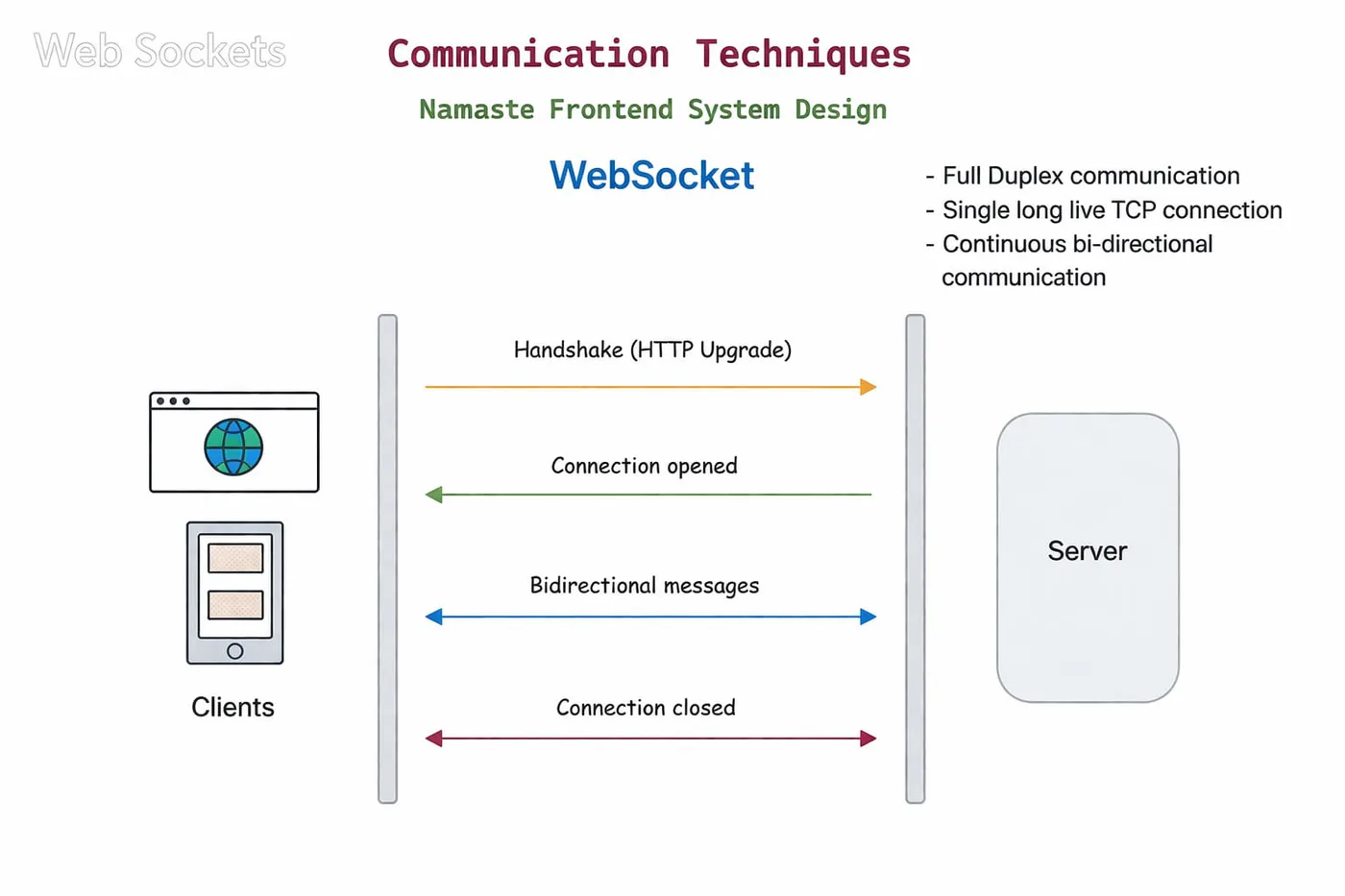
WebSockets provide a persistent, full-duplex (two-way) communication channel between client and server. Once the connection is established, both sides can send data at any time without creating new HTTP requests.
Simple example
Think of it like a phone call: you connect once, both sides can talk anytime, and there’s no need to reconnect repeatedly.
How a WebSocket connection is established
WebSockets begin as a normal HTTP request and then get upgraded to a WebSocket connection.
1. Client sends an HTTP request
GET /socket.io/?EIO=4&transport=websocket HTTP/1.1
Connection: Upgrade
Upgrade: websocket
2. Server responds
HTTP/1.1 101 Switching Protocols
Upgrade: websocket
Connection: Upgrade
3. Connection is upgraded
- No longer standard HTTP
- Becomes a persistent connection
What "Upgrade" means
- HTTP follows request → response → close
- WebSocket follows open → continuous communication
How it works after connection
- Client connects once
- Connection remains open
- Client can send data anytime
- Server can send data anytime
- No repeated requests are required
How the code fits into this
const io = new Server(server);- attaches a Socket.IO server to the HTTP server, which handles the upgrade.io.on("connection", (socket) => { ... })- runs once per connected client;socketis that client’s open connection.socket.emit("chat-message", msg);- sends to one client.io.emit("chat-message", msg);- broadcasts to every connected client.
Advantages
- Real-time communication
- No repeated requests
- Bidirectional communication
- Efficient
Challenges in real-world systems
- Sticky sessions
- Horizontal scaling (multi-server sync)
- Connection limits
- Reconnection handling
- Message ordering and reliability
- Security concerns
- Authentication handling
- Firewalls and proxy issues
- Backward compatibility (fallback support)
- Testing and debugging becomes tough
- Resource cleanup (disconnect handling, memory leaks)
Short Polling vs Long Polling vs WebSockets
- Short polling: repeated requests - simple but inefficient.
- Long polling: wait, then reconnect - more efficient, but still HTTP-based.
- WebSockets: one persistent connection - true real-time communication.
Code: a simple chat
index.html
<!DOCTYPE html>
<html>
<head>
  <title>Simple Chat</title>
</head>
<body>
  <h2>Simple Chat</h2>
  <ul id="messages"></ul>

  <form id="form">
    <input id="input" placeholder="Type message..." autocomplete="off" />
    <button type="submit">Send</button>
  </form>

  <script src="/socket.io/socket.io.js"></script>
  <script>
    const socket = io();
    const form = document.getElementById("form");
    const input = document.getElementById("input");
    const messages = document.getElementById("messages");

    form.addEventListener("submit", (e) => {
      e.preventDefault();
      const msg = input.value.trim();
      if (!msg) return;
      socket.emit("chat-message", msg);
      input.value = "";
    });

    socket.on("chat-message", (msg) => {
      const li = document.createElement("li");
      li.textContent = msg;
      messages.appendChild(li);
      window.scrollTo(0, document.body.scrollHeight); // auto scroll
    });
  </script>
</body>
</html>
index.js
const express = require("express");
const { createServer } = require("node:http");
const { join } = require("node:path");
const { Server } = require("socket.io");

const app = express();
const server = createServer(app);
const io = new Server(server);

// Serve frontend
app.get("/", (req, res) => {
  res.sendFile(join(__dirname, "index.html"));
});

// Socket connection
io.on("connection", (socket) => {
  console.log("User connected");

  socket.on("chat-message", (msg) => {
    console.log("Message:", msg);
    io.emit("chat-message", msg);
  });

  socket.on("disconnect", () => {
    console.log("User disconnected");
  });
});

server.listen(5000, () => {
  console.log("Server running on http://localhost:5000");
});