Communication
Long Polling
Overview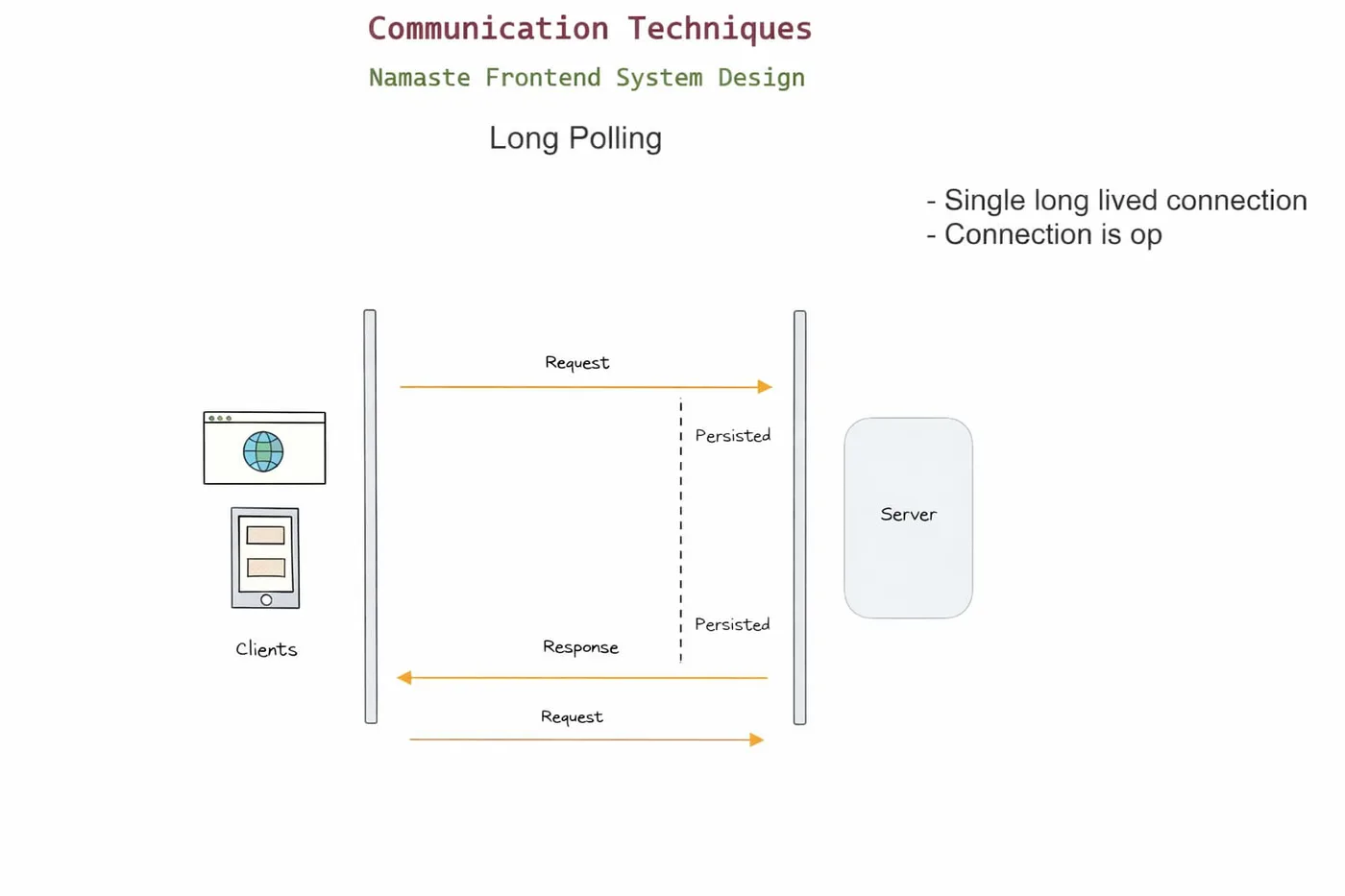
Long polling is a technique where the client asks the server: "Do you have any new data for me?" But instead of replying immediately, the server waits until new data is available (or a timeout happens). So unlike short polling, the client doesn’t keep asking every few seconds - it keeps one request open.
Simple example
You message your friend and, instead of asking again and again, you say: "Reply when you have something." Then you just wait. As soon as your friend replies, you get the answer immediately.
How it works
- Client sends a request to the server
- Server does not respond immediately
- Server waits until new data is available, or a timeout occurs
- Server sends the response
- Client immediately sends a new request
- This cycle continues
Example use cases
- Chat applications (before WebSockets)
- Live notifications
- Messaging systems
- Collaborative tools (basic real-time sync)
- Live dashboards with moderate real-time needs
Advantages
- More efficient than short polling - requests only complete when there is new data, cutting unnecessary calls.
- Closer to real-time - data is delivered as soon as it becomes available.
- No advanced protocols needed - works over standard HTTP, no WebSocket required.
- Better for medium-scale apps - handles real-time needs without overwhelming the server like short polling.
Disadvantages
- Keeps connections open - each client holds a connection for a long time, consuming server resources.
- Harder to scale - with many users, managing open connections becomes complex.
- Timeout handling needed - the server must handle cases where no data arrives for a long time.
- Slight delay between cycles - after receiving data, the client has to send a new request.
Short Polling vs Long Polling
- Short polling: "Did you reply?" (asked repeatedly)
- Long polling: "Tell me when you reply." (waits for a response)
Code
index.html
<!doctype html>
<html lang="en">
  <head>
    <meta charset="UTF-8" />
    <title>Long Polling Example</title>
  </head>
  <body>
    <h1>Long Polling Example</h1>
    <div id="data-container"></div>

    <script>
      async function getData(lastData = "") {
        try {
          const response = await fetch(`/getData?lastData=${encodeURIComponent(lastData)}`);
          const result = await response.json();
          document.getElementById("data-container").textContent = result.data;
          getData(result.data); // immediately wait for the next change
        } catch (error) {
          console.log(error);
          setTimeout(() => getData(lastData), 3000); // back off, then retry
        }
      }

      getData();
    </script>
  </body>
</html>
index.js
const express = require("express");
const app = express();

let data = "Our initial data here";
const waitingClientList = [];

app.get("/", (req, res) => {
  res.sendFile(__dirname + "/index.html");
});

app.get("/getData", (req, res) => {
  if (data !== req.query.lastData) {
    res.json({ data }); // client is behind - answer right away
  } else {
    waitingClientList.push(res); // nothing new - hold the request open
  }
});

app.get("/updateData", (req, res) => {
  data = req.query.data;

  // Release every client that was waiting
  while (waitingClientList.length > 0) {
    const client = waitingClientList.pop();
    client.json({ data });
  }

  res.json({ success: "Data updated successfully" });
});

app.listen(5000, () => console.log("App running on port 5000"));