Communication
Server-Sent Events (SSE)
Overview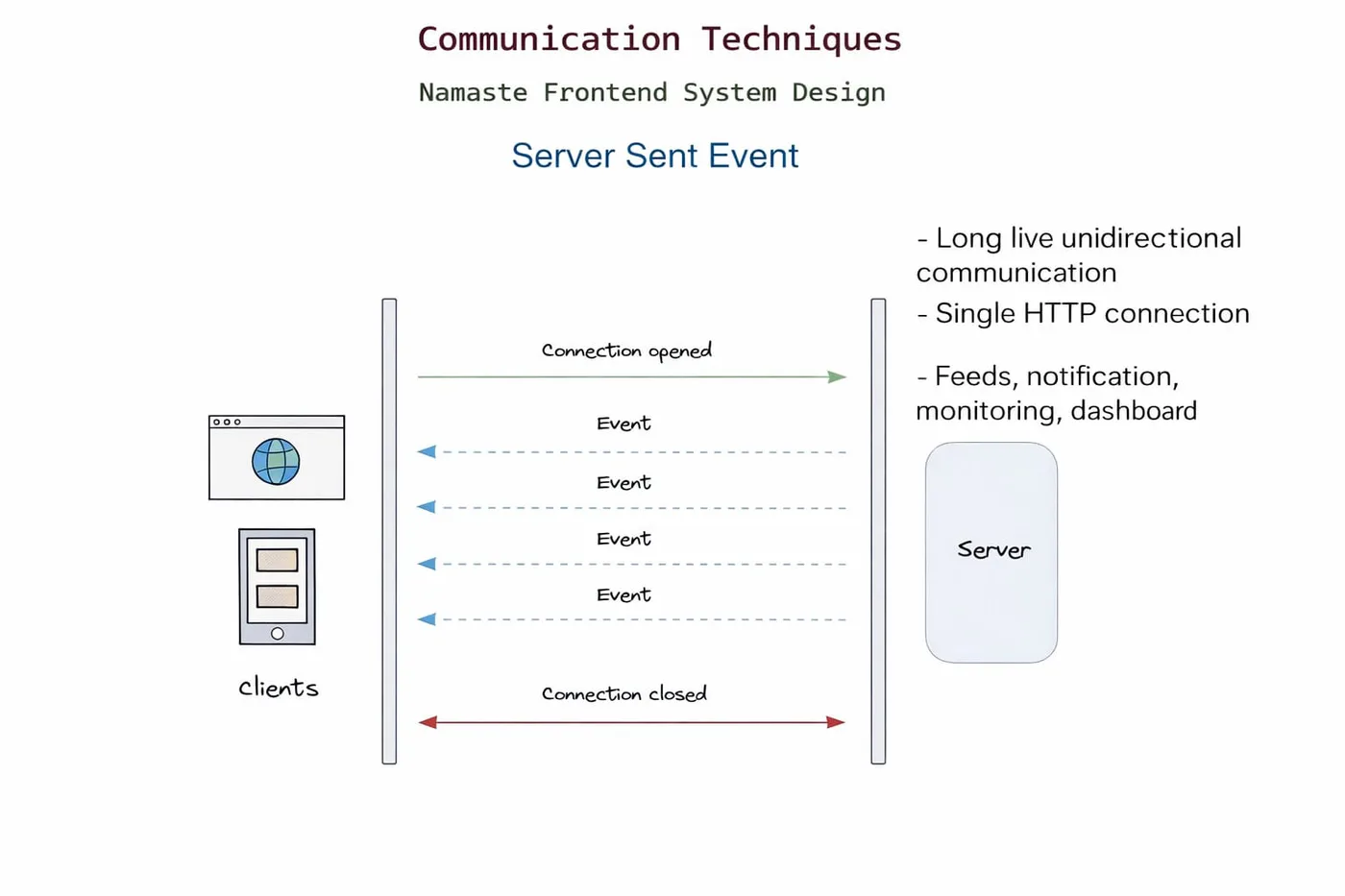
Server-Sent Events (SSE) is a unidirectional communication protocol where the server pushes real-time updates to the client over a single long-lived HTTP connection.
- Client → Server (only once, to establish the connection)
- Server → Client (continuous stream of updates)
How SSE works
- Client sends an HTTP request using
EventSource - Server responds with special headers (
text/event-stream) - Connection stays open (not closed like REST)
- Server continuously sends messages in a specific format
- Browser listens and triggers events automatically
Basic connection (client)
const eventSource = new EventSource("/sse");

eventSource.onmessage = (event) => {
  console.log(event.data);
};
Required headers (server)
Content-Type: text/event-stream
Cache-Control: no-cache
Connection: keep-alive
Message format (very important)
Each message must follow this structure:
data: Hello\n\n
data: Server Time: 10:30\n\n- Must start with
data: - Must end with a blank line (
\n\n) - Without
\n\n→ the browser will not emit the event
Data types
SSE only sends text. For JSON, stringify on the server and parse on the client:
// Server
res.write(`data: ${JSON.stringify({ msg: "hello" })}\n\n`);

// Client
const data = JSON.parse(event.data);
Custom events
// Server
res.write(`event: notification\n`);
res.write(`data: New message\n\n`);

// Client
eventSource.addEventListener("notification", (event) => {
  console.log(event.data);
});
Event fields
| Field | Purpose |
|---|---|
data | The actual payload |
event | Custom event name |
id | Event ID (used for reconnection) |
retry | Reconnection delay |
id: 1
event: update
data: Hello\n\n
Connection behaviour
- Persistent HTTP connection
- Automatically reconnects on failure
- Uses Last-Event-ID to resume where it left off
Advantages
- Simple to implement (HTTP based)
- Built-in auto reconnect
- Lightweight compared to WebSockets
- Works over standard HTTP/1.1
Limitations
- One-way communication only
- Text-only data
- Limited browser connection count (~6 per domain on HTTP/1.1)
- Not ideal for high-frequency real-time apps
Challenges
- Sticky sessions required for scaling
- Authentication handling
- Firewalls / proxies may block or buffer the stream
- Backward compatibility issues
- Testing and debugging becomes tough
- Resource cleanup (open connections, memory leaks)
- Browser compatibility (no support in older browsers like IE - polyfills needed)
- Connection limits per browser/tab can cause issues in large apps
- Load balancers may terminate idle connections (timeouts)
- Load balancing complexity - connections must stay on the same server, which requires sticky sessions or a shared pub/sub like Redis
- No native support for binary data
SSE vs WebSockets
| Feature | SSE | WebSocket |
|---|---|---|
| Direction | One-way | Two-way |
| Protocol | HTTP | WS |
| Complexity | Simple | Complex |
| Use case | Notifications, logs | Chat, gaming |
When to use SSE
- Live dashboards
- Notifications
- Log streaming
- AI streaming responses
- Stock updates (low frequency)
When NOT to use SSE
- Chat apps (bi-directional)
- Multiplayer apps
- High-frequency real-time systems
Code
index.html
<!DOCTYPE html>
<html lang="en">
<head>
  <meta charset="UTF-8" />
  <title>SSE Demo</title>
</head>
<body>
  <h1>SSE Demo</h1>
  <div id="sse-data"></div>

  <script>
    const eventSource = new EventSource("/sse");
    const container = document.getElementById("sse-data");

    eventSource.onmessage = (event) => {
      console.log(event.data);
      container.innerText = event.data;
    };

    eventSource.onerror = () => {
      console.log("Connection lost");
    };
  </script>
</body>
</html>
index.js
const express = require("express");
const { join } = require("node:path");

const app = express();

app.get("/", (req, res) => {
  res.sendFile(join(__dirname, "index.html"));
});

app.get("/sse", (req, res) => {
  // Required headers for SSE
  res.setHeader("Content-Type", "text/event-stream");
  res.setHeader("Cache-Control", "no-cache");
  res.setHeader("Connection", "keep-alive");

  // Send initial event
  res.write(`data: Connected to SSE\n\n`);

  // Send data every 5 sec
  const intervalId = setInterval(() => {
    const time = new Date().toLocaleTimeString();
    res.write(`data: Server Time: ${time}\n\n`);
  }, 5000);

  // Handle client disconnect
  req.on("close", () => {
    console.log("Client disconnected");
    clearInterval(intervalId);
    res.end();
  });
});

const PORT = 3000;
app.listen(PORT, () => {
  console.log(`Server running on http://localhost:${PORT}`);
});