Networking
GraphQL
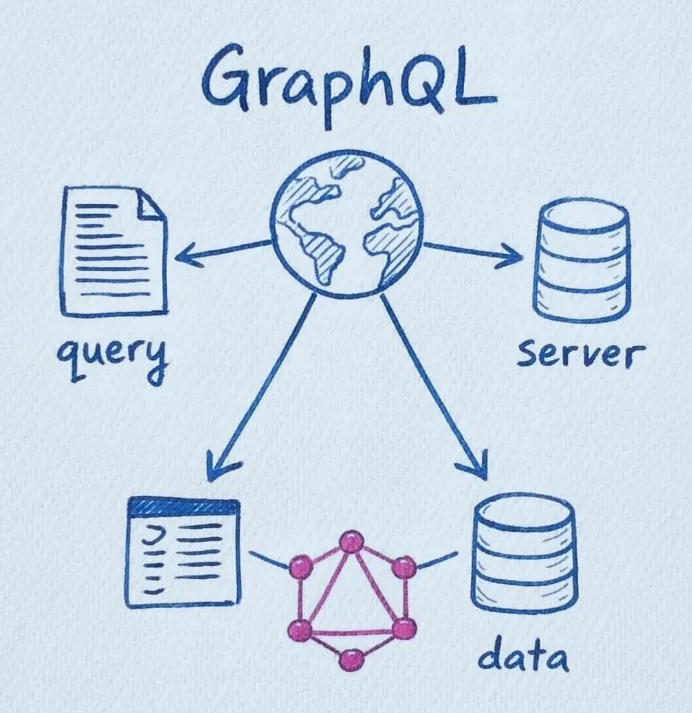
GraphQL is a query language for APIs and a runtime for executing those queries, where the client can request exactly the data it needs from a single endpoint instead of relying on multiple fixed REST endpoints; it uses a strongly typed schema to define available data and relationships, supports queries for fetching data and mutations for changing data, and helps reduce over-fetching and under-fetching by giving frontend developers more control over the response structure.
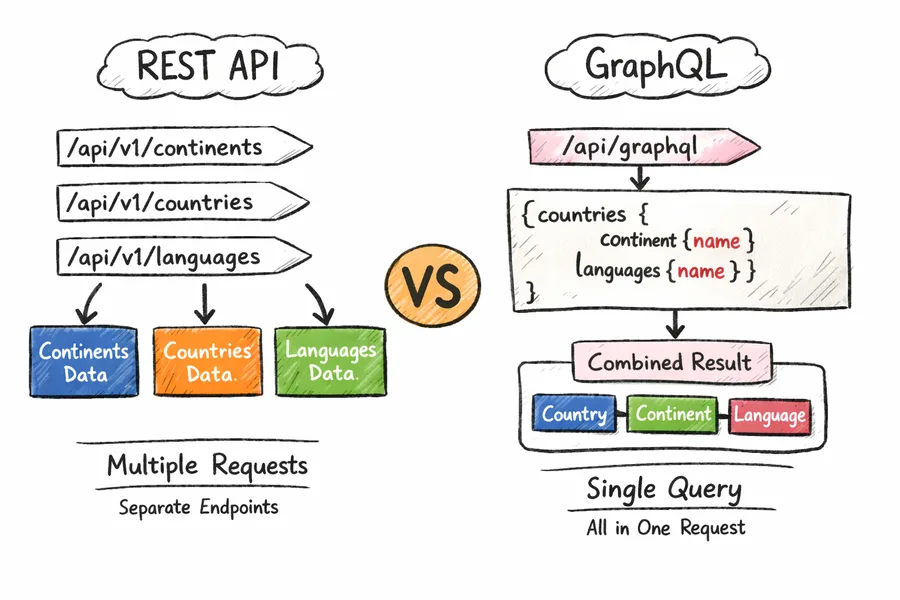
| Feature | REST API | GraphQL |
|---|---|---|
| Endpoints | api/v1/continents, api/v1/countries, api/v1/languages | api/graphql |
| How data is fetched | Separate endpoints for continents, countries, and languages | One endpoint for all data |
| Example use case | To get country with its continent and language, you may call countries, then continents, then languages | To get country, continent, and language, one query is enough |
| Data returned | Server gives fixed response | Client asks only for needed fields |
| Requests | Often multiple requests | Usually single request |
| Best for | Simple resource-based APIs | Flexible nested data fetching |
Benefits of GraphQL
| Benefit | What it means |
|---|---|
| Avoids over-fetching | Client gets only the required fields, not extra unwanted data |
| Avoids under-fetching | Related data can be fetched in a single query instead of multiple requests |
| Better mobile performance | Smaller responses and fewer network calls help on slow internet |
| Single endpoint | Everything is usually handled through one /graphql endpoint |
| Flexible data fetching | Frontend can shape the response based on UI needs |
| Strongly typed schema | Clear structure makes APIs easier to understand and validate |
| Faster frontend development | Frontend teams can request exactly what each screen needs |
| Easier evolution of APIs | New fields can be added without breaking existing queries |
| Better developer experience | Tools like autocomplete, validation, and docs work very well |
| Efficient for complex data | Great for nested and connected data like users, posts, comments, products |
Comparison of REST vs GraphQL
| Feature | REST | GraphQL |
|---|---|---|
| Full form / idea | Representational State Transfer, an API style based on resources | Query language for APIs where client asks for exact data |
| Endpoint structure | Multiple endpoints for different resources | Usually a single endpoint like /graphql |
| Data fetching style | Server decides response shape | Client decides response shape |
| Response data | Fixed structure | Flexible structure |
| Over-fetching | Common, extra data may come even when not needed | Avoided, only requested fields are returned |
| Under-fetching | Common, may require multiple endpoints to complete one screen | Reduced, related data can be fetched together |
| Number of network requests | Often multiple requests for related resources | Often one query is enough |
| Nested/related data | Harder, usually fetched through separate endpoints | Natural and easy through nested queries |
| Mobile performance | Can be less efficient due to larger payloads and extra requests | Often better because of smaller payloads and fewer calls |
| Backend control | Strong backend control over response format | More client freedom in choosing fields |
| Frontend flexibility | Limited by endpoint design | Very high, UI can ask for exactly what it needs |
| API evolution | Often needs versioning like /api/v1, /api/v2 | Usually evolves by adding fields, often no versioning |
| Versioning | Common | Rarely needed |
| Documentation | External docs often needed | Schema acts like self-documentation |
| Tooling | Good, but depends on framework/docs | Excellent, with schema introspection, autocomplete, playground |
| Learning curve | Easier for beginners | Slightly harder at first |
| Caching | Easier with HTTP caching | More complex, usually handled at client/tool level |
| Error handling | Uses HTTP status codes clearly | Often returns 200 OK with errors inside response body too |
| File upload | Straightforward with HTTP forms | Possible, but not as direct as REST |
| Rate limiting / monitoring | Simpler per endpoint | Can be trickier because all requests hit one endpoint |
| Security handling | Easier to manage endpoint-wise | Needs extra care for deep queries and query cost control |
| Best use case | Simple CRUD APIs, public APIs, predictable resources | Complex apps with connected data and dynamic UI needs |
Components of GraphQL
1. Schema / Types
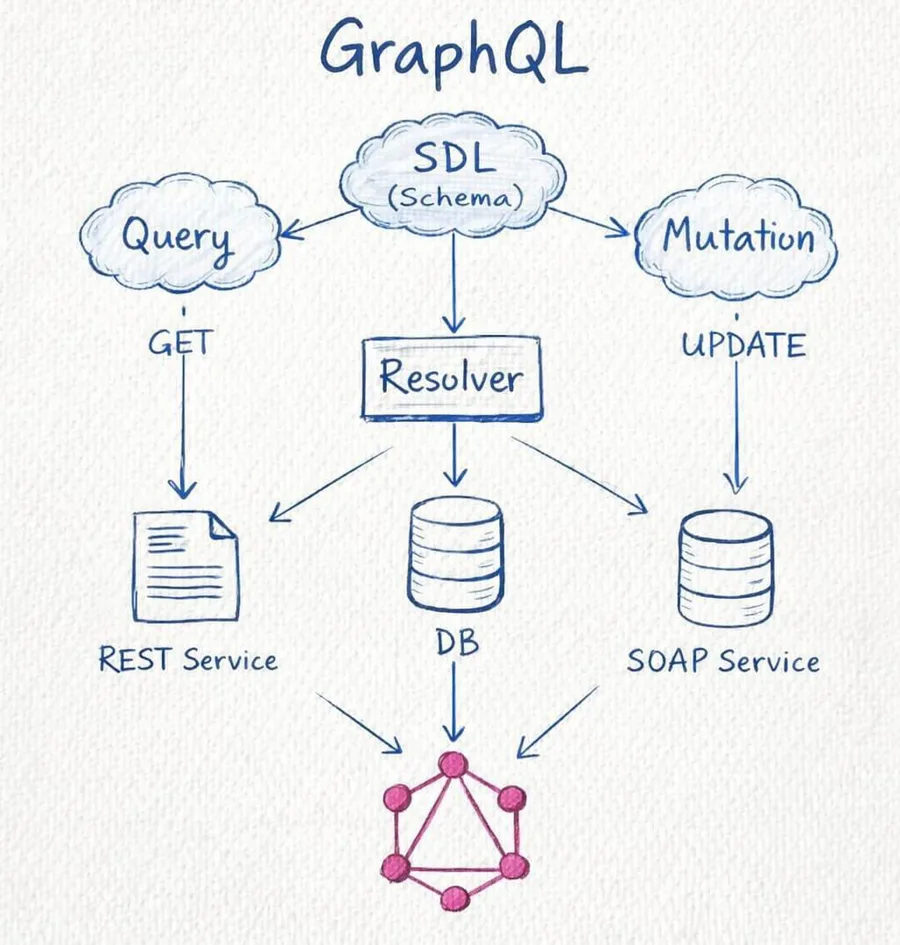
The schema is the blueprint of a GraphQL API. It defines what data exists, what fields are available, and what operations clients can perform. Types describe the shape of data, like User, Post, or Product.
type User {
  id: ID!
  name: String!
  age: Int
}

type Query {
  users: [User]
}
Here, User is a type, and the schema says that users can be fetched.
2. Query
A query is used to fetch data from the GraphQL server. It is similar to a GET request in REST, but the client can choose exactly which fields it wants.
query {
  users {
    id
    name
  }
}
This fetches only id and name for all users.
3. Mutation
A mutation is used to create, update, or delete data. It is similar to POST, PUT, PATCH, or DELETE in REST.
type Mutation {
  addUser(name: String!, age: Int): User
}
Example mutation:
mutation {
  addUser(name: "Aman", age: 21) {
    id
    name
    age
  }
}
This adds a new user and returns the created user data.
4. Resolver
A resolver is a function that contains the actual logic for returning data for a query or mutation. It tells GraphQL how to fetch or update the data.
const resolvers = {
  Query: {
    users: () => {
      return [
        { id: "1", name: "Aman", age: 21 },
        { id: "2", name: "Rahul", age: 22 }
      ];
    }
  },
  Mutation: {
    addUser: (_, args) => {
      const newUser = {
        id: "3",
        name: args.name,
        age: args.age
      };
      return newUser;
    }
  }
};
Here: users resolver returns all users, addUser resolver creates a new user.
Code
1. Initialize Node project and installation
npm init -y
npm install @apollo/server graphql
2. Create server.js
import { ApolloServer } from '@apollo/server';
import { startStandaloneServer } from '@apollo/server/standalone';
import { typeDefs } from './typeDef.js';
import { resolvers } from './resolvers.js';

async function startServer() {
  const server = new ApolloServer({ typeDefs, resolvers });

  const { url } = await startStandaloneServer(server, {
    listen: { port: 4000 },
  });

  console.log(`Server ready at ${url}`);
}

startServer();
3. Create typeDef.js
export const typeDefs = `#graphql
  type Author {
    id: ID
    name: String
    age: Int
  }
  type Book {
    id: ID
    title: String
    publishedYear: Int
    author: Author
  }

  type Query {
    authors: [Author]
    books: [Book]
  }

  type Mutation {
    addAuthor(name: String, age: Int): Author
    addBook(title: String, publishedYear: Int, authorId: ID): Book
  }
`;
4. Create resolvers.js
const data = {
  authors: [
    { id: "1", name: "J.K. Rowling", age: 55 },
    { id: "2", name: "George R.R. Martin", age: 72 },
    { id: "3", name: "J.R.R. Tolkien", age: 81 }
  ],
  books: [
    { id: "1", title: "Harry Potter and the Sorcerer's Stone", publishedYear: 1997, authorId: "1" },
    { id: "2", title: "Harry Potter and the Chamber of Secrets", publishedYear: 1998, authorId: "1" },
    { id: "3", title: "Harry Potter and the Prisoner of Azkaban", publishedYear: 1999, authorId: "3" }
  ]
};

export const resolvers = {
  Book: {
    author: (book) => {
      return data.authors.find(author => author.id === book.authorId);
    }
  },
  Query: {
    authors: () => {
      return [data.authors[0], data.authors[1], data.authors[2]];
    },
    books: () => {
      return [data.books[0], data.books[1], data.books[2]];
    }
  },
  Mutation: {
    addAuthor: (_, { name, age }) => {
      const newAuthor = { id: String(data.authors.length + 1), name, age };
      data.authors.push(newAuthor);
      return newAuthor;
    },
    addBook: (_, { title, publishedYear, authorId }) => {
      const newBook = { id: String(data.books.length + 1), title, publishedYear, authorId };
      data.books.push(newBook);
      return newBook;
    }
  }
};
5. Run the server
node server.js6. Query
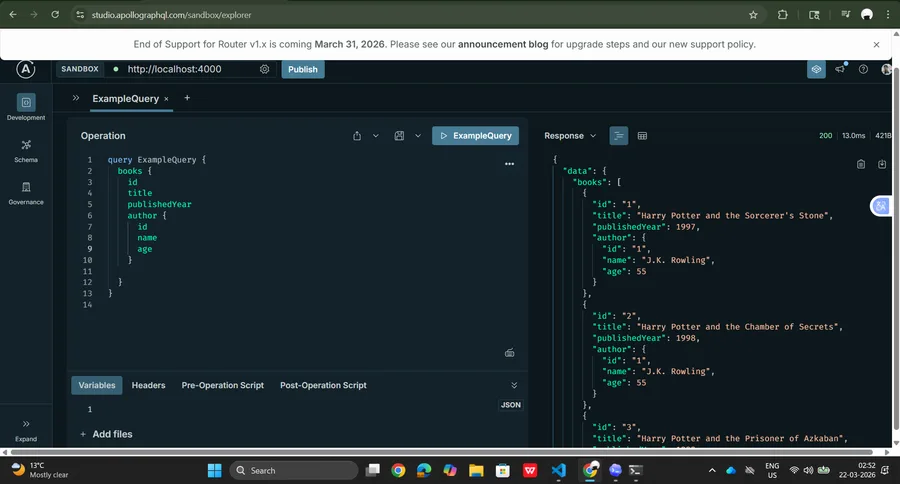
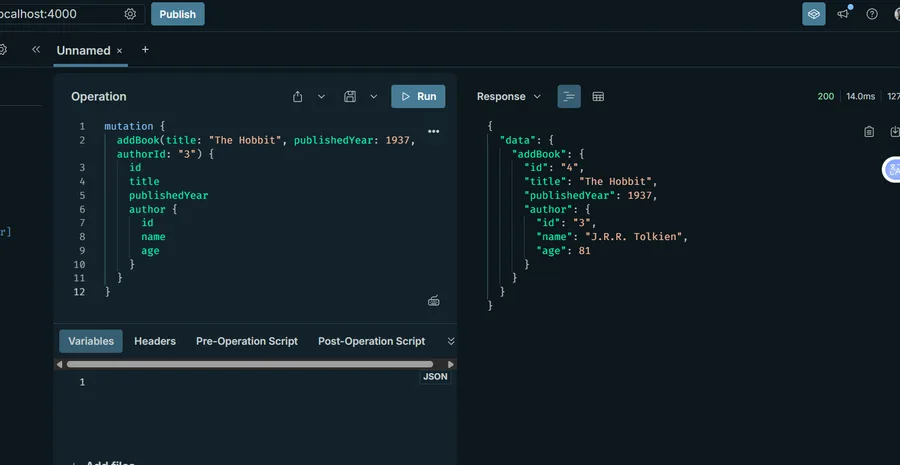
7. Mutations