Networking
How the Web Works
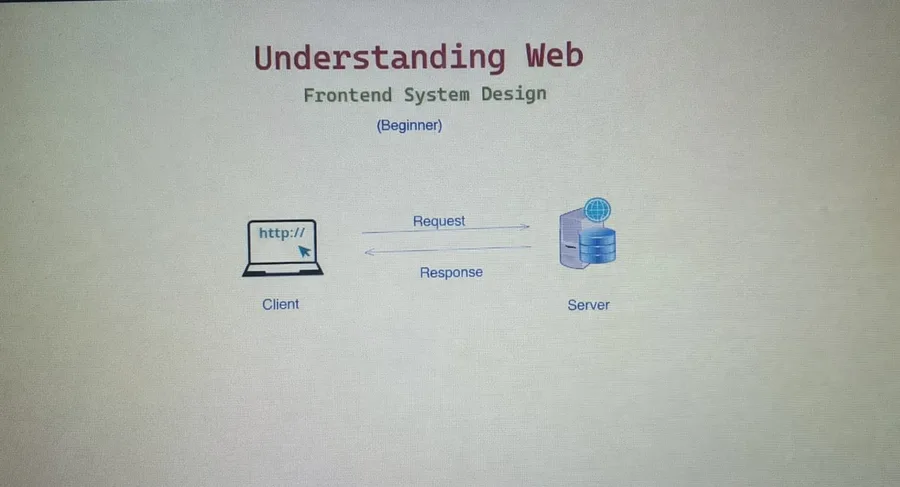
What happens when you type google.com?
At a high level, when you type google.com or flipkart.com, you make a request from the client to a server, and the server sends back a response. A server is simply any machine that provides resources or services to other machines.
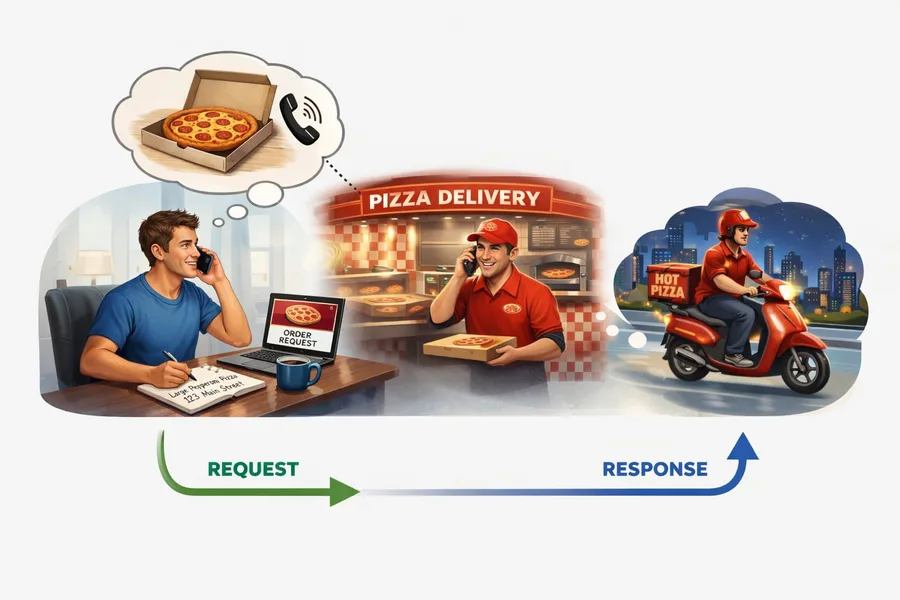
This is similar to ordering a pizza. You (the client) place an order with the pizza shop (the server). The shop prepares your order and delivers the pizza (the response) back to you.
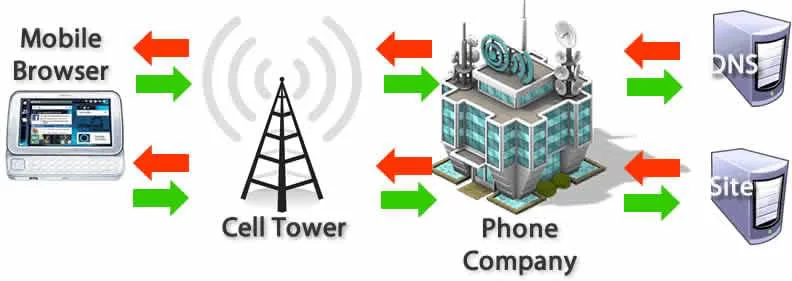
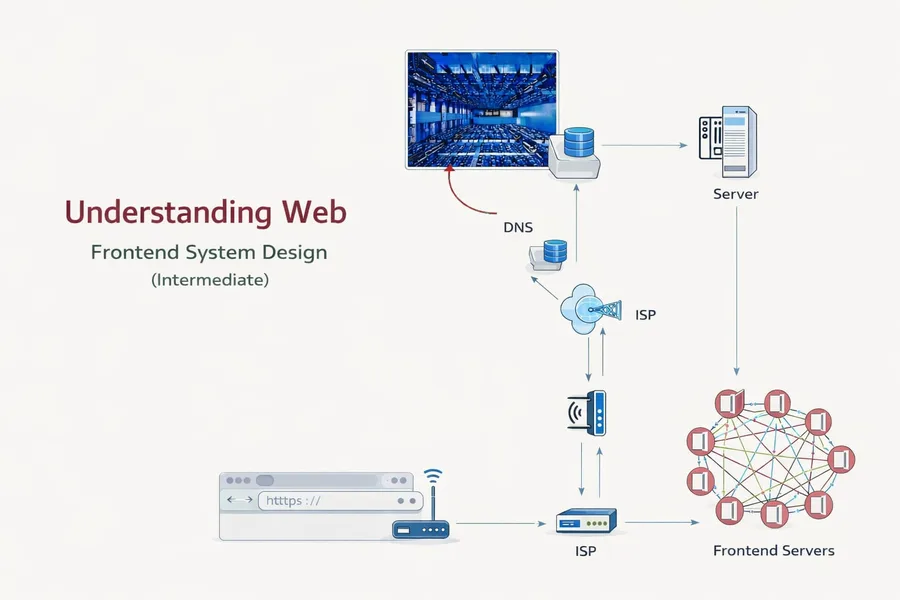
When you type google.com on your device, the request first goes through your internet service provider or mobile network (cell tower), which then queries DNS servers to find the IP address of the website. The IP address is like the home address needed to deliver a pizza. Once the IP address is found, the request is sent to the appropriate data center/server, which returns the requested data or resources back to your device.
Internet
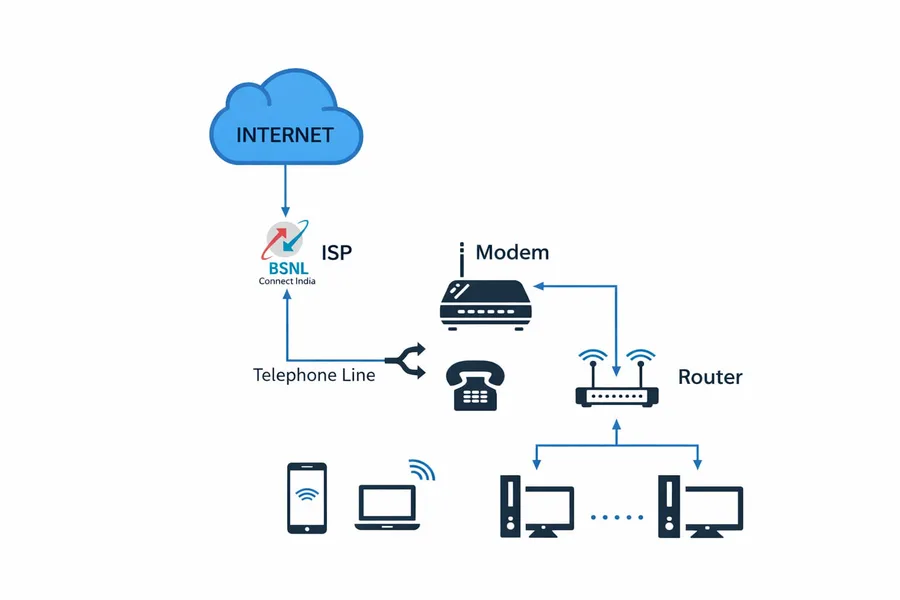
In modern internet usage, devices like smartphones, laptops, and smart TVs connect to a Wi-Fi router in a home or office network. The router manages all local devices and forwards their internet requests to a modem, which converts the digital data into signals that can travel through a fiber, DSL, or cable line to the Internet Service Provider (ISP) such as BSNL, Jio, or Airtel. The ISP then connects the request to the global internet, routing it to the appropriate server where the website or service is hosted. The server processes the request and sends the response back through the ISP, modem, and router to the user's device, allowing the webpage or data to load.
How Do We Connect One Device to Another?
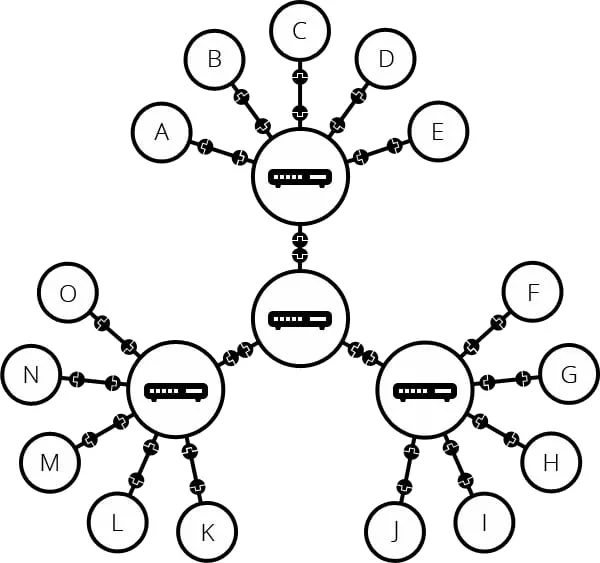
Connecting every computer directly to every other computer with wires is not practical. If there are n devices, it would require n × (n − 1) / 2 connections, which would quickly become a networking nightmare.
Instead, devices connect to a router or switch using Ethernet (LAN) cables or Wi-Fi. The router acts as a central point that allows many devices to communicate without needing direct connections between each pair.
Routers from homes and offices connect to the Internet Service Provider (ISP). These ISP networks are linked together through high-speed optical fiber cables, which connect to central hubs, backbone networks, and data centers.
Through this system, your request can travel across networks and reach the servers that host websites and services.
DNS - Domain Name Hierarchy
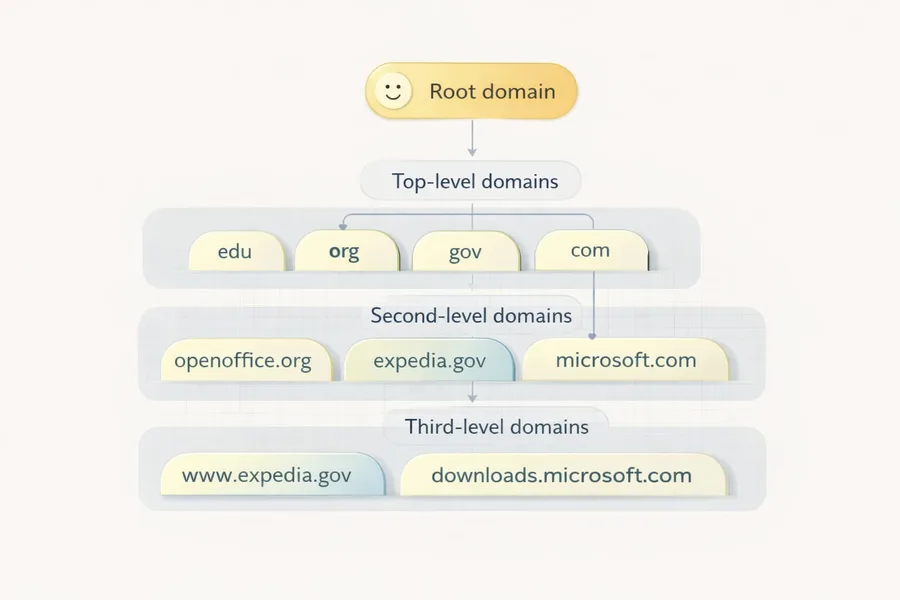
The Domain Name System (DNS) is organized in a hierarchical structure with different levels.
Root Level Domain - This is the top of the DNS hierarchy. It is represented by a dot ( . ), although we usually don't write it. Root servers direct queries to the appropriate Top-Level Domain (TLD) servers. Example: google.com. → the dot at the end represents the root.
Top-Level Domain (TLD) - This is the last part of a domain name, located just before the root. Examples: .com, .org, .net, .in. There are different types of TLDs: Generic TLDs (gTLD) → .com, .org, .net; Country Code TLDs (ccTLD) → .in, .us, .uk. Example: in google.com, .com is the Top-Level Domain.
Second-Level Domain (SLD) - This is the main name of the website, registered by individuals or organizations. Example: google.com, flipkart.com. Here google and flipkart are Second-Level Domains.
Third-Level Domain (Subdomain) - A third-level domain is a subdomain created under the second-level domain. Examples: mail.google.com, docs.google.com, support.microsoft.com. Here mail, docs, and support are third-level domains (subdomains).
| Level | Part |
|---|---|
| Root Level | . |
| Top-Level Domain | com |
| Second-Level Domain | google |
| Third-Level Domain | mail |
Server - Deep Dive

A server is a machine that provides data or services to other machines (clients). Often, a single machine cannot handle all the traffic or load, so multiple servers are used together to serve requests.
When a user accesses a website, the request reaches a server that processes it and returns the required data or resources. For example, when you visit a specific route like /chirag, the server has code that handles that route and returns the appropriate response (such as a webpage, JSON data, or other resources).
How Do You Travel Across Servers?
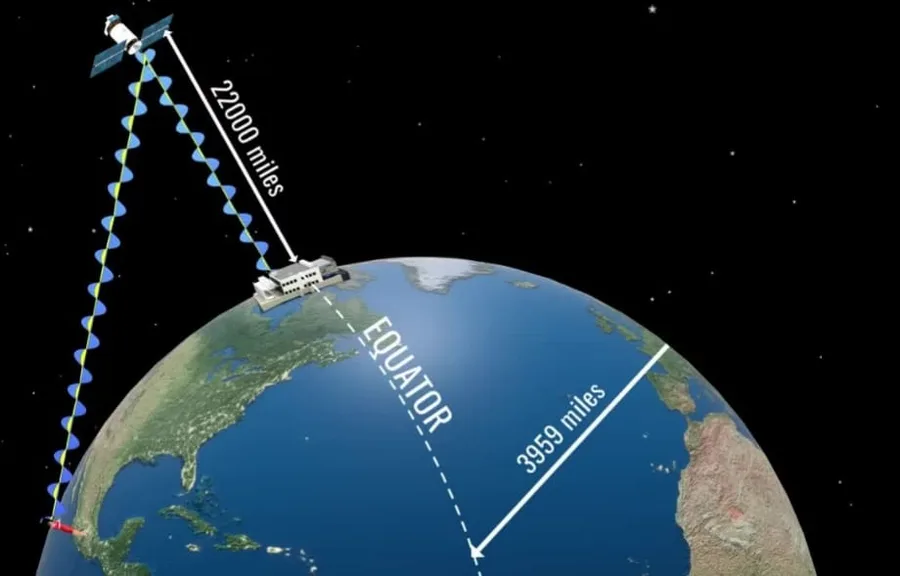
You can send a request to a server located in another country. The data travels through a global network of routers, cables, and wireless systems to reach that server.
Most long-distance internet communication happens through undersea and land optical fiber cables, although some parts may use wireless links.
However, the farther the server is from the user, the higher the latency (delay). This is why many companies place servers in multiple regions or data centers around the world to reduce latency and serve users faster.
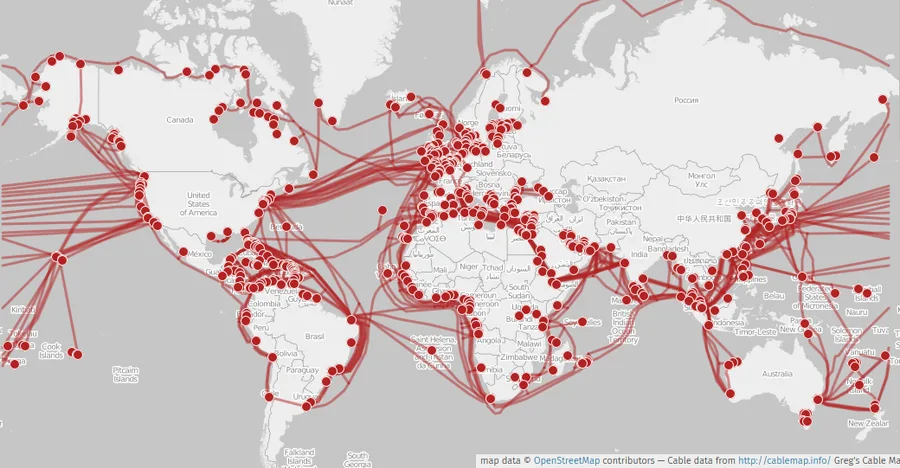
To connect networks across countries and continents, we use optical fiber cables, many of which run under the sea (submarine cables). Optical fibers transmit data as pulses of light through very thin strands of glass or plastic, carrying huge amounts of data over long distances with very little signal loss. These undersea fiber cables form the backbone of the global internet.
ISPs and How Data Travels Between Countries
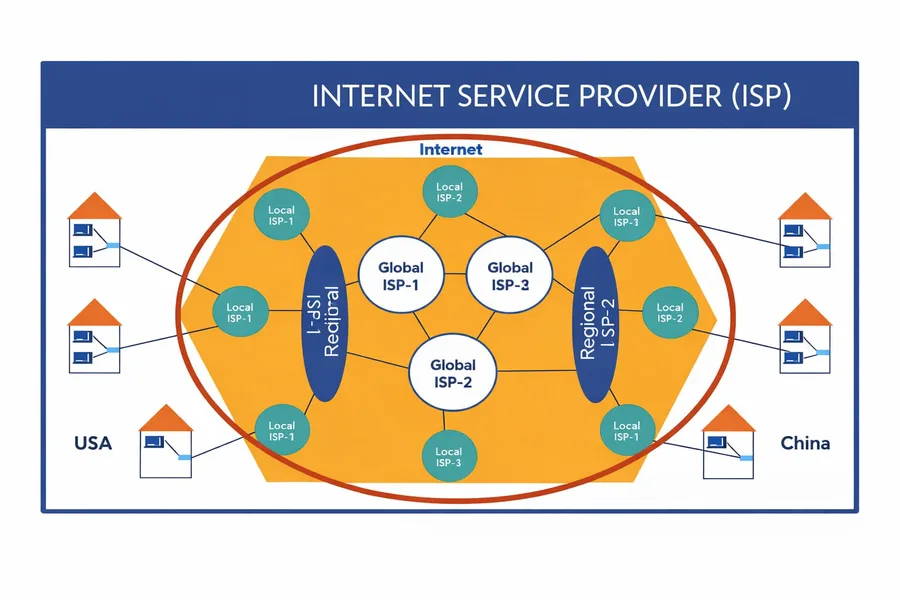
Local ISP - A local ISP provides internet access to homes and businesses in a city or small region. Your device connects to this ISP through Wi-Fi, Ethernet, or mobile networks.
Regional ISP - Local ISPs connect to regional ISPs, which manage larger network infrastructure across multiple cities or states and handle a much larger volume of traffic.
Global ISP (Backbone Providers) - Regional ISPs connect to global backbone providers. These companies operate massive high-speed fiber networks, including undersea optical fiber cables, that connect different countries and continents.
How Data Travels Between Countries
- Your device sends the request to your local ISP.
- The request moves to a regional ISP.
- It then travels through global backbone networks via optical fiber cables, often across oceans.
- The request eventually reaches the data center hosting the server.
Data is not sent as one large piece. Instead, it is broken into small units called packets. Each packet travels through multiple routers, and every step it takes is called a hop. Routers decide the best path for each packet until it finally reaches the destination server. The server then sends packets of the response back through the network to your device, where they are reassembled to form the final data.
Summary
So far, we understand that when you request a website, the process works roughly like this: your device (phone or computer) sends the request to your router, which forwards it to your ISP (Internet Service Provider). The ISP then queries the DNS servers to find the IP address of the domain you requested.
Once the IP address is found, your request is routed through the internet to the server hosting the website. The server processes the request and sends back the response, usually in the form of HTML, CSS, and JavaScript. Finally, the browser renders these resources to display the webpage to the user.
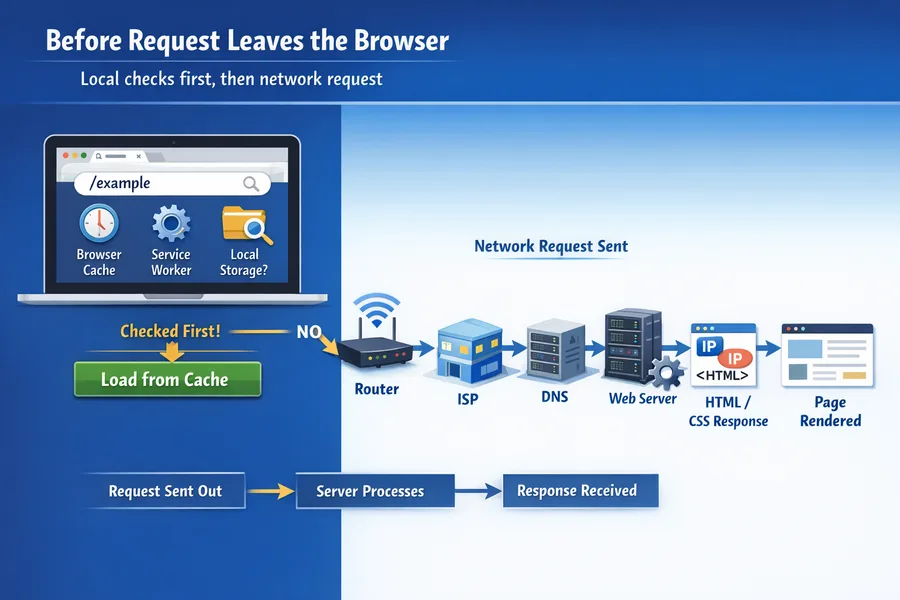
But there is a twist: before the request even leaves your browser, several checks happen first. The browser looks for the resource in places like the browser cache, service worker cache, and other local storage mechanisms. If the resource is found locally, it can be returned immediately without making a network request.
If the resource is not found in the cache, only then does the request leave your device and travel across the internet to the server. Nowadays, caching can also happen at multiple levels in the network - routers, ISPs, and CDN edge servers may store cached copies of frequently requested resources, returning data much faster without needing to reach the original server.
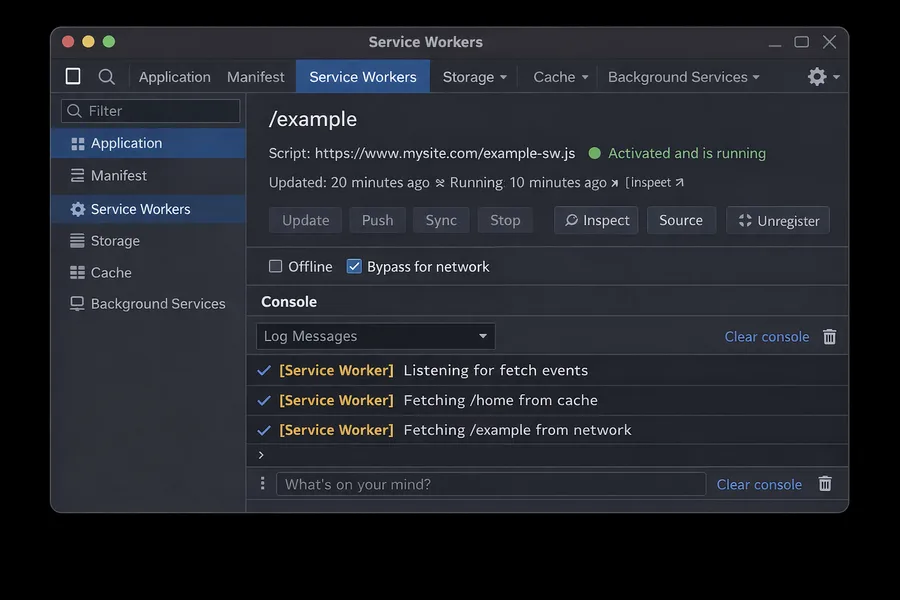
Before the request leaves your browser, it also checks if there is a Service Worker registered for the website. A Service Worker acts like a small programmable layer between the browser and the network - it can intercept network requests (fetch events) and return a cached resource directly, allowing the page to load faster and even work offline in some cases. If the resource is not available in the service worker cache, the request is forwarded to the network normally.
ISP Peering
ISP peering is when two networks or ISPs connect directly to exchange internet traffic instead of sending it through other intermediary networks. This reduces latency, cost, and the number of hops data must travel. Large companies like Google use extensive peering with ISPs and place edge servers (Google Global Cache) close to or inside ISP networks, making services like YouTube and Google Search faster and more efficient.
More About DNS - ICANN

ICANN (Internet Corporation for Assigned Names and Numbers) is the organization responsible for managing and coordinating the internet's domain name system (DNS). Its main job is to ensure every domain name is unique and correctly mapped to its corresponding IP address so users can reliably reach websites. ICANN oversees top-level domains (TLDs) such as .com, .org, and country domains like .in, working with domain registries and registrars to keep the global domain naming system organized, stable, and secure.
WHOIS is a public lookup tool you can use to look up the ownership and registration details of any domain.
Parcel Delivery of Your Data (TCP Handshake)
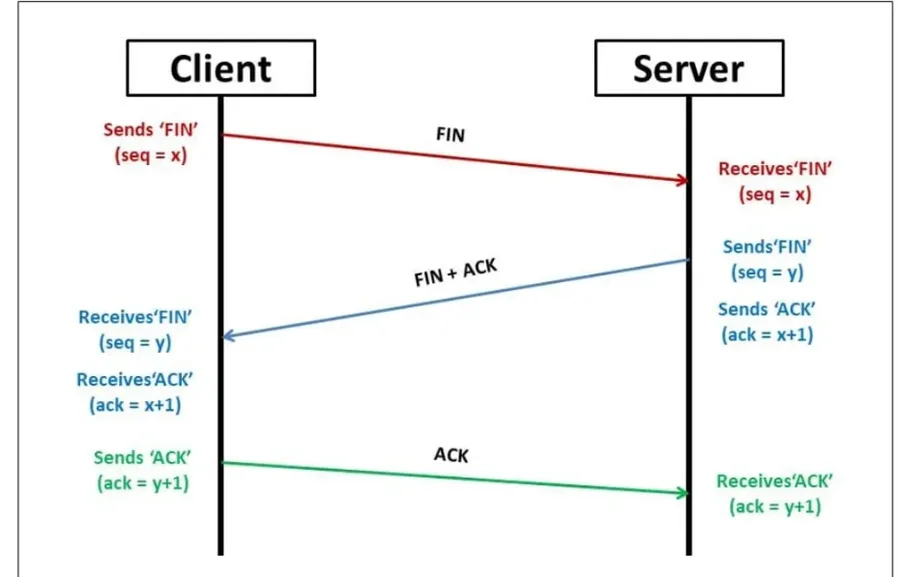
Imagine you want to send a parcel to a shop:
- SYN - "Are you there?" - You call the shop and ask, "Hello, can you receive my parcel?" This is like the client sending a SYN request to check if the server is ready.
- SYN-ACK - "Yes, I'm ready." - The shop replies, "Yes, I'm here and ready to receive it." This is the server acknowledging (ACK) your request and also confirming (SYN) it is ready.
- ACK - "Great, sending now." - You respond, "Okay, I'm sending the parcel now." This final ACK confirms the connection.
Rendering a Page - Browser Rendering Pipeline
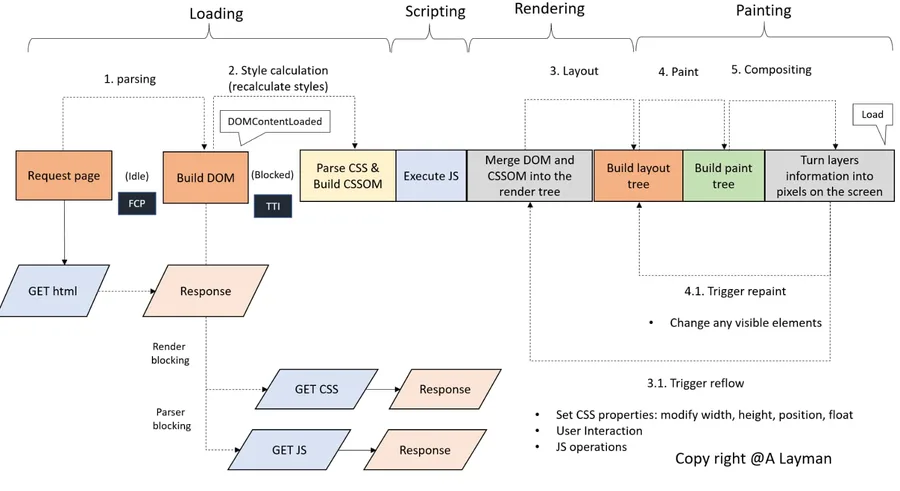
Loading → Scripting → Rendering → Painting. When a browser receives a webpage response, it processes the content through several internal stages before pixels appear on the screen.
1. Loading (Parsing Resources) - The process begins when the browser requests the HTML document from the server. The browser parses the HTML and starts building the DOM (Document Object Model). While parsing HTML, the browser discovers external resources like CSS and JavaScript, which are downloaded and parsed to build the CSSOM (CSS Object Model).
- CSS is render-blocking because styles are needed before rendering.
- JavaScript can be parser-blocking, meaning HTML parsing pauses until the script executes.
- Once HTML is parsed, the DOMContentLoaded event fires.
2. Scripting (Executing JavaScript) - After resources are loaded, the browser executes JavaScript, which can modify the DOM, change CSS styles, trigger additional network requests, and attach event listeners. Because JavaScript can modify the structure and styles of the page, it can cause the browser to recalculate styles.
3. Rendering (Layout / Reflow) - The browser combines the DOM and CSSOM to build the Render Tree, which only contains visible elements and their computed styles. Then the browser performs Layout (Reflow): it calculates size, determines position, and determines the geometry of each element. Layout can be triggered by:
- Changing width / height
- Changing position or float
- User interactions
- Certain JavaScript operations
4. Painting - After layout is computed, the browser builds a paint tree and draws visual elements like text, colors, images, borders, and shadows. These drawing instructions are converted into pixels.
5. Compositing - Finally, the browser combines different layers and sends them to the GPU, which converts layer information into actual pixels displayed on the screen. Modern browsers use layer compositing to improve performance, especially for animations and scrolling.
DOM and CSSOM
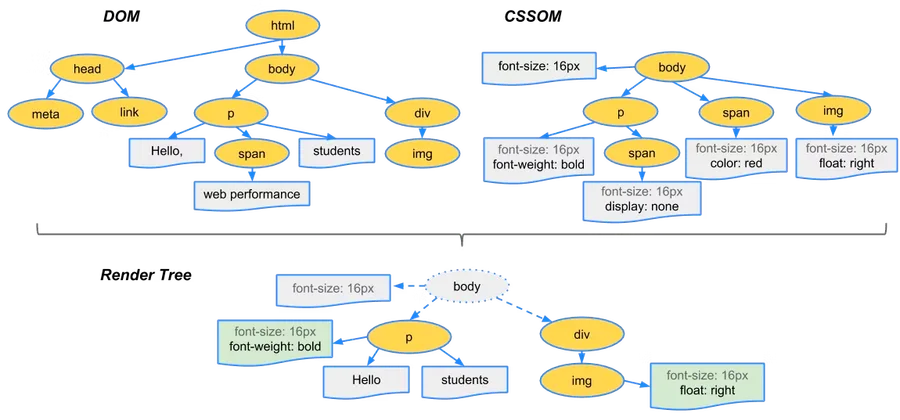
DOM (Document Object Model) - The DOM is created when the browser parses the HTML document. As the browser reads the HTML line by line, it converts the elements into a tree structure of nodes called the DOM tree.
HTML → Parsing → DOM TreeCSSOM (CSS Object Model) - The CSSOM is created when the browser downloads and parses CSS files. The CSS rules are converted into another tree-like structure that represents all the styles of the page.
CSS → Parsing → CSSOM TreeTogether - Once both are ready, the Render Tree combines the structure (DOM) and styling (CSSOM) to determine how elements should appear on the screen.
DOM + CSSOM → Render Tree → Layout → PaintFlow Summary
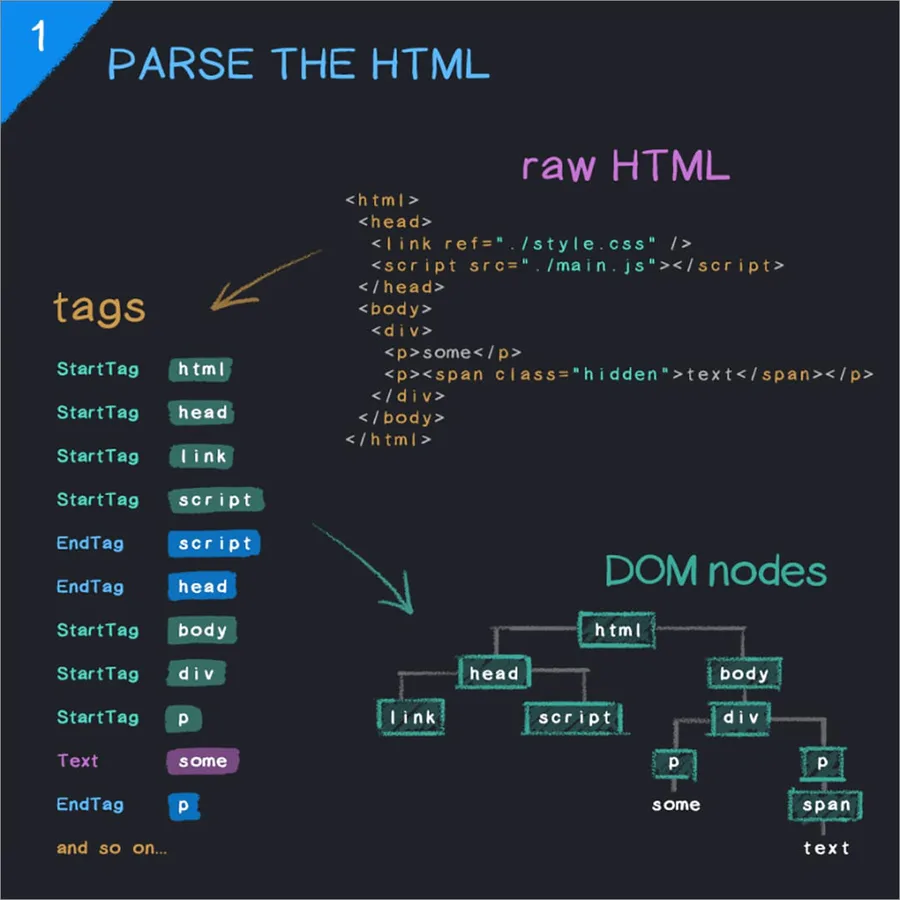
1. Parse the HTML - The browser downloads the HTML file and reads it top to bottom, breaking it into tokens (start tags, end tags, text) and using those tokens to construct the DOM tree, where each HTML element becomes a node and nested elements form parent-child relationships.
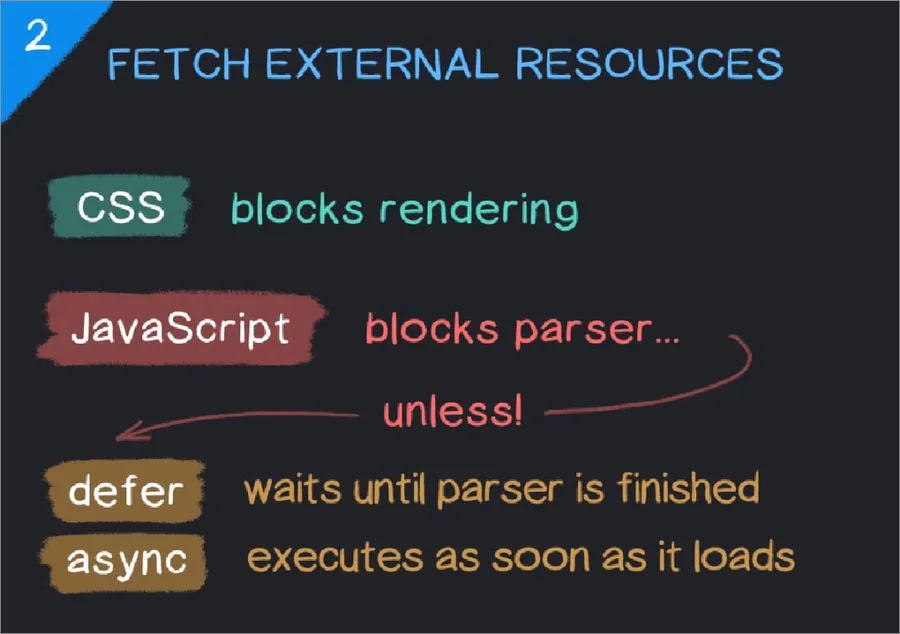
2. Fetch External Resources - While parsing the HTML, the browser encounters references to external resources such as CSS files (<link>), JavaScript files (<script>), images, or fonts, and sends separate network requests to download them.
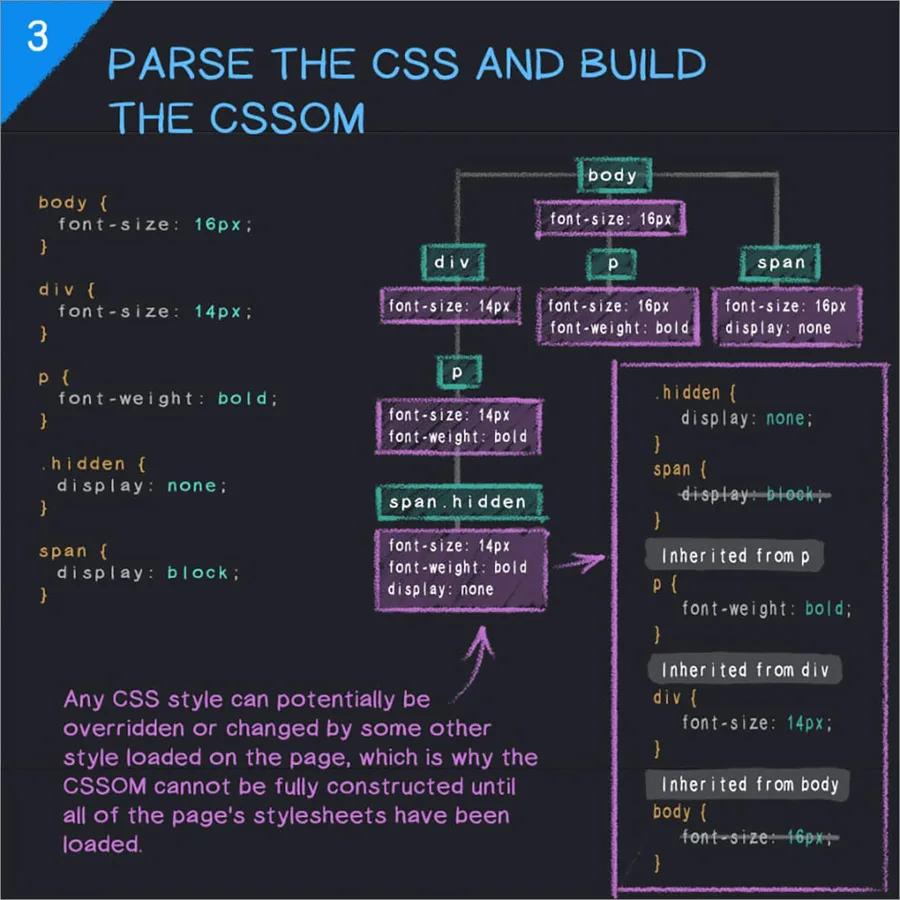
3. Parse CSS and Build the CSSOM - Once CSS files are downloaded, the browser parses the CSS rules into the CSSOM, representing all styling information including selectors, properties, and inheritance rules.
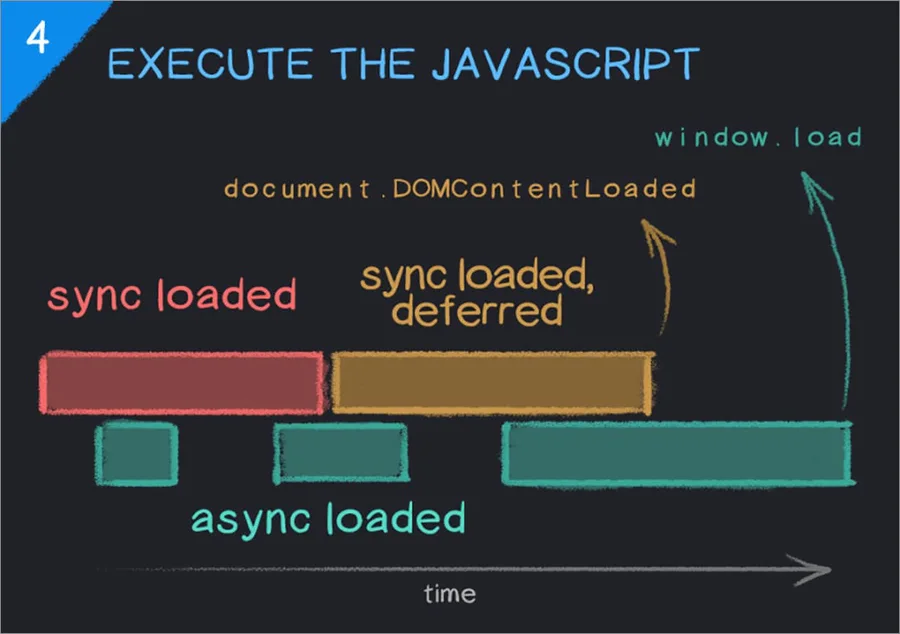
4. Execute JavaScript - The browser executes JavaScript using its JS engine. Scripts can interact with the DOM and CSSOM, modify elements, add new nodes, or change styles dynamically - sometimes pausing HTML parsing while scripts run to keep the DOM consistent.
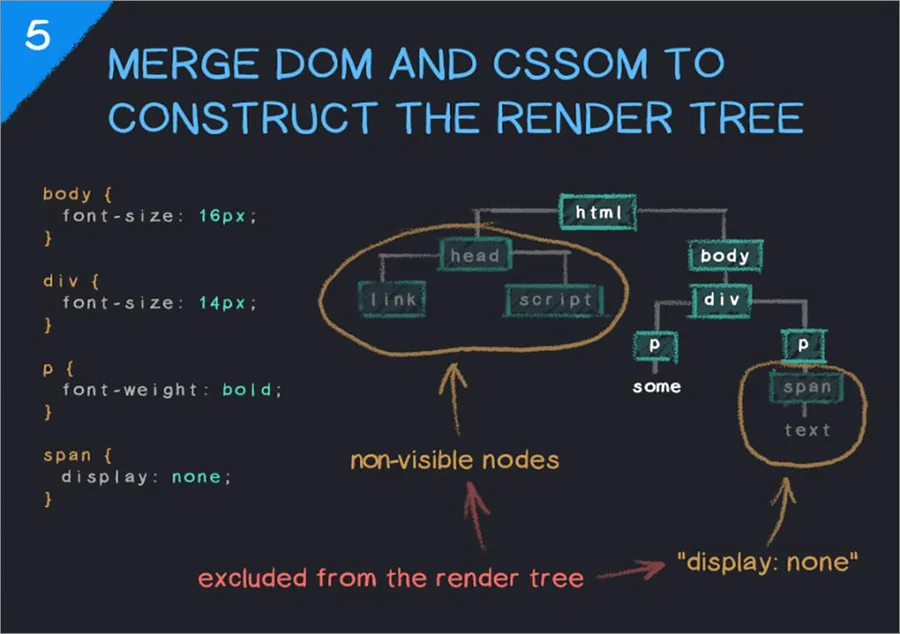
5. Merge DOM and CSSOM to Form the Render Tree - The browser combines the DOM and CSSOM into the Render Tree, containing only the elements that need to be visually displayed, along with their computed styles. Hidden elements like <head> do not appear here.
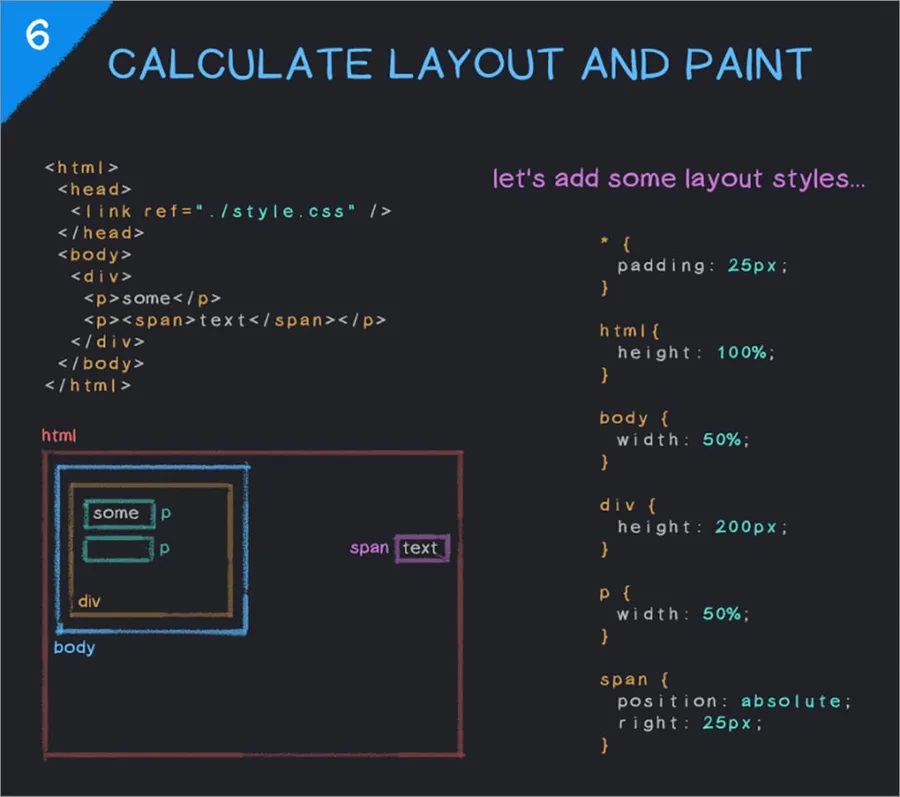
6. Layout and Paint - The browser calculates the exact position and size of every element in the render tree during layout (reflow), then the paint step draws the pixels of each element - text, colors, borders, and images - producing the final visual webpage.
HTML
  ↓
Parse HTML → DOM
  ↓
Fetch external resources (CSS, JS, images)
  ↓
Parse CSS → CSSOM
  ↓
Execute JavaScript
  ↓
DOM + CSSOM → Render Tree
  ↓
Layout (calculate positions)
  ↓
Paint (draw pixels on screen)