Project case study
Mom's Kitchen Restaurant
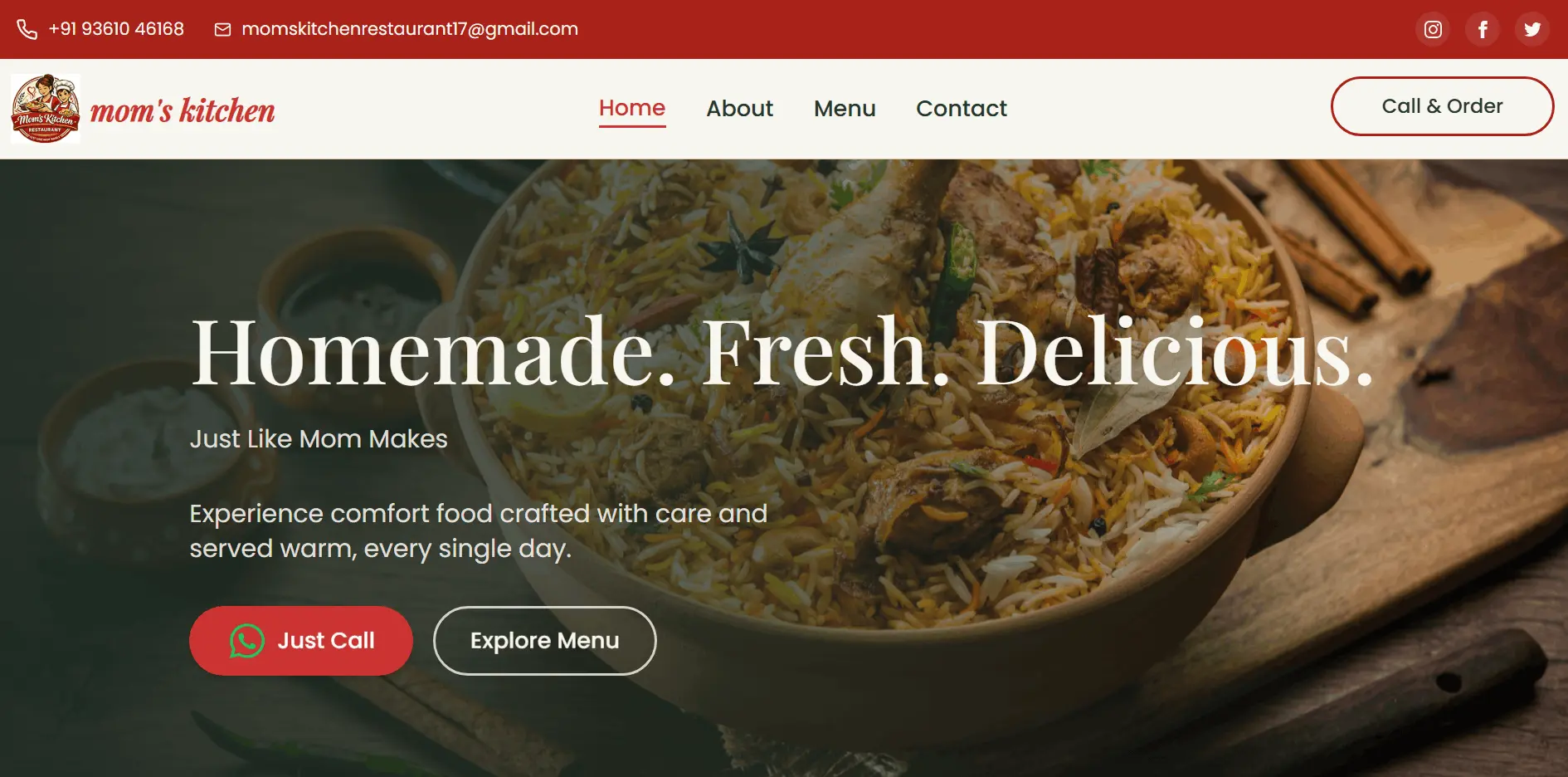
A fast, mobile-first website for a home-style restaurant, built to turn visitors into phone and WhatsApp orders.
Objective
What this project sets out to do
Mom's Kitchen is a real, family-run restaurant that takes most of its orders by phone and WhatsApp. It needed a simple online presence that customers can find on Google, browse on their phones, and use to order in one tap - without the cost and complexity of a full ordering platform. The site presents the menu with prices and photos, the restaurant's story and services, and makes calling or messaging the kitchen the obvious next step on every page.
- Show the full menu with photos and prices, filterable by category, so customers can decide before they call.
- Make ordering effortless: one tap to WhatsApp with a pre-filled message, or to call.
- Load fast on mid-range phones and mobile data, and rank for local searches with per-page SEO.
- Present the restaurant warmly: its story, catering and event services, testimonials and location.
Features
What you can do in the app
- Home page: hero with an "Order on WhatsApp" button, menu categories, features, services (catering, birthdays, weddings, events), an about preview and testimonials.
- Menu page: 20+ dishes with photos, prices in ₹ and descriptions, filtered by All, Starters, Fast Food and Main Dishes with animated layout transitions.
- One-tap ordering: a WhatsApp deep link with a pre-filled greeting, plus click-to-call buttons.
- About and Contact pages: the restaurant's story, contact details, opening hours and an embedded Google Map.
- Responsive navigation: a top contact bar on desktop and an animated slide-down menu on mobile.
- Per-page SEO: unique titles and meta descriptions for every page, plus a sitemap, robots.txt and llms.txt.
- Performance: lazy-loaded routes, WebP images with explicit dimensions and lazy loading, and year-long caching for static assets.
Tech stack
What it's built with, and why
Frontend
- React 18 + TypeScript
- Typed components, and a typed
MenuItemmodel for the menu data. - Vite (SWC)
- Fast builds and route-level code splitting.
- React Router 6
- Home, About, Menu and Contact routes, lazy-loaded with
Suspense. - Tailwind CSS
- Mobile-first layout with custom theme colors and serif headings for a warm look.
- shadcn/ui (Radix UI)
- Accessible, unstyled primitives for buttons, inputs and toasts.
- Framer Motion
- Entrance animations, the animated mobile menu and smooth menu filtering.
SEO and UX
- React Helmet Async
- Per-page
<title>and meta description for search and sharing. - Sonner
- Lightweight toast notifications.
- React Icons, Lucide
- WhatsApp, social and UI icons.
Hosting
- Netlify
- Custom domain (moms-kitchen.in), SPA fallback, and immutable cache headers for assets and images.
State management
How state is managed with local React state
A restaurant website has very little that changes while you use it, so the state is deliberately minimal and kept as close to where it is used as possible: no global store, no context for app data. The menu lives in a typed static module, each page owns its own small piece of UI state with useState, and anything that can be calculated - like the filtered menu - is derived on render rather than stored. Page-level concerns (SEO tags, scroll position) are handled by providers and small components instead of shared state.
The store
// main.tsx - app-wide providers, no data store
createRoot(document.getElementById("root")!).render(
  <HelmetProvider>          {/* per-page <title> and meta tags */}
    <App />
  </HelmetProvider>
);

// App.tsx - routes are code-split; ScrollToTop resets scroll per page
const Menu = lazy(() => import("./pages/Menu"));

<BrowserRouter>
  <ScrollToTop />
  <Suspense fallback={null}>
    <Routes>
      <Route path="/" element={<Index />} />
      <Route path="/menu" element={<Menu />} />
      {/* ...about, contact, 404 */}
    </Routes>
  </Suspense>
</BrowserRouter>
The slices
Menu data (static module)
A typed menuItems array: id, name, description, price, image and category.
import- Written by:
- Developers, in
data/menuItems.ts- updating the menu is a code change and a redeploy. - Read by:
- The Menu page and the home page categories.
Menu filter (Menu page)
activeCategory: all, starters, main or fastfoods.
setActiveCategory- Written by:
- The category buttons.
- Read by:
- The derived
filteredItemslist and the active button style.
Mobile menu (Header)
isMenuOpen - whether the mobile navigation is open.
setIsMenuOpen- Written by:
- The menu toggle, and every link (closes the menu after navigating).
- Read by:
AnimatePresence, which animates the menu in and out.
Route (React Router)
The current page and location.pathname.
<Link>navigate- Written by:
- Navigation links.
- Read by:
- The active nav link style, and
ScrollToTop, which scrolls up on every page change.
Document head (Helmet)
Each page's <title> and meta description.
<Helmet>- Written by:
- Every page component.
- Read by:
- The browser tab, search engines and link previews.
How data flows
1. Menu filtering: one piece of state, everything else derived
The menu page stores only which category is selected. The visible dishes are calculated from the static menu on every render, so there is no second copy of the list to keep in sync. Framer Motion's layout animation makes cards slide into place as the filter changes.
Click "Starters"
setActiveCategory
Re-render
activeCategory changed
Derive
menuItems.filter(...)
Animate
motion layout reflows the grid
pages/Menu.tsx - store the choice, derive the listtype Category = "all" | "starters" | "main" | "fastfoods";
const [activeCategory, setActiveCategory] = useState<Category>("all");
// Derived on every render - never stored, so it can't go stale
const filteredItems =
activeCategory === "all"
? menuItems
: menuItems.filter((item) => item.category === activeCategory);
<motion.div layout className="grid grid-cols-1 sm:grid-cols-2 lg:grid-cols-4 gap-6">
{filteredItems.map((item) => <MenuCard key={item.id} item={item} />)}
</motion.div>2. Menu as typed data, not a database
With about twenty dishes that change rarely, a backend would add cost and moving parts for no benefit. The menu is a typed TypeScript module: the compiler catches a missing price or a misspelled category, the images are bundled and optimized by Vite, and the whole menu ships with the page - no loading spinner.
menuItems.ts
typed MenuItem[]
Vite build
type-checked, images hashed
Static bundle
served from Netlify
Menu page
renders instantly
data/menuItems.ts - the shape every dish must haveexport interface MenuItem {
id: number;
name: string;
description: string;
price: number;
image: string;
category: "starters" | "main" | "drinks" | "desserts" | "fastfoods";
}
export const menuItems: MenuItem[] = [
{
id: 11,
name: "Chicken Pakoda",
description: "Crispy deep-fried chicken bites with Indian spices.",
price: 99,
image: chickenPakoda,
category: "starters",
},
// ...
];3. Ordering: hand off to WhatsApp instead of building a cart
Instead of cart state, checkout and payments, the site hands the customer to the channel the restaurant already uses. The order button builds a WhatsApp deep link with a pre-filled, URL-encoded greeting and opens it in a new tab - one tap from the menu to a conversation with the kitchen.
Order on WhatsApp
button on the hero
Build link
wa.me/<number>?text=...
Open WhatsApp
new tab / app
Chat with kitchen
order confirmed by phone
components/home/Hero.tsxconst handleChatOrder = () => {
const phoneNumber = "91XXXXXXXXXX"; // restaurant's WhatsApp number
const message = "Hi Mom's Kitchen! 👋 I'd like to place a food order.";
const whatsappUrl = `https://wa.me/${phoneNumber}?text=${encodeURIComponent(message)}`;
window.open(whatsappUrl, "_blank", "noopener,noreferrer");
};4. Page changes: SEO tags and scroll handled per route
Each page declares its own title and description with <Helmet>, which HelmetProvider writes into the document head - so every page has its own search snippet. A tiny ScrollToTop component watches the route and scrolls back to the top on every navigation, which a single-page app does not do by default.
Click a nav link
React Router
Lazy page loads
Suspense
<Helmet>
title + meta updated
ScrollToTop
smooth scroll to top
components/ScrollToTop.tsxconst ScrollToTop: React.FC = () => {
const location = useLocation();
useEffect(() => {
window.scrollTo({ top: 0, left: 0, behavior: "smooth" });
}, [location.pathname]);
return null;
};Design decisions
- Why no Redux, Context or React Query for data? Nothing is shared between pages and nothing comes from a server at runtime. Adding a store would mean more code to maintain with no benefit - local
useStatekeeps each piece of state next to the component that uses it. - Derive, don't duplicate. The filtered menu, the active nav link and the active category style are all computed from one source value, so they can never disagree.
- Static, typed content. The menu is TypeScript data, which makes it safe to edit (the compiler checks every dish) and instant to load (no API call).
- Use the channel customers already use. WhatsApp and phone links replace a cart and checkout, which keeps the site simple and matches how the restaurant actually takes orders.
- Performance is part of the design. Code-split routes, WebP images with fixed dimensions (no layout shift) and long-lived cache headers make the site fast on mobile data.
See it in action
Try the live app or browse the full source on GitHub.