Roadmaps
The Frontend Developer Roadmap: What to Learn, in What Order
Search "frontend developer roadmap" and you get a chart with 150 boxes: five frameworks, four CSS tools, three state libraries and a dozen build tools. It looks thorough, and it leaves most beginners stuck on the question that matters: what do I learn first, and when am I ready to apply?
This roadmap is shorter on purpose. It has four stages, in the order that actually builds on itself, and each stage ends with a clear test so you know when to move on. It also lists what you can safely skip until you're on the job.
The roadmap at a glance
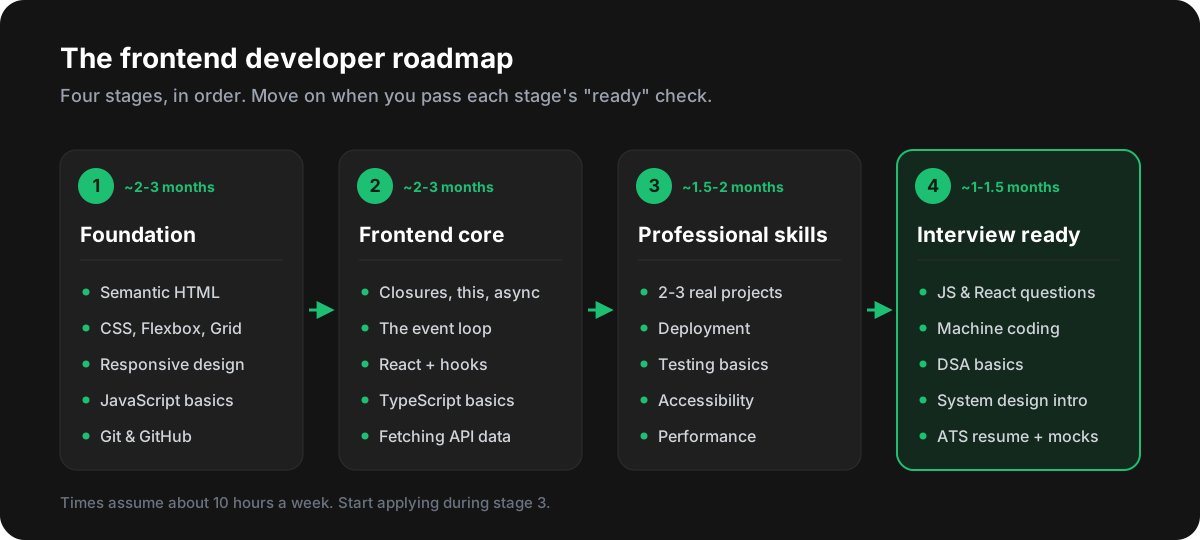
The order matters more than the speed. Most people who struggle in React interviews don't have a React problem - they have a JavaScript problem, because they jumped to a framework before the language made sense.
Stage 1: Foundation
Everything a browser shows comes down to three languages: HTML for structure, CSS for layout and style, and JavaScript for behaviour. Learn them properly once and every framework gets easier.
- HTML: semantic tags (
header,nav,main,article,button), forms, links and images with properalttext. - CSS: the box model, Flexbox, Grid, responsive design with media queries, and units like
remand%. - JavaScript basics: variables, functions, arrays and objects, loops, and changing the page with DOM methods and events.
- Git and GitHub: commit, branch, push, and open a pull request. Every job uses them from day one.
Semantic HTML is the most underrated part of this stage. It costs nothing, and it makes your pages accessible to screen readers and easier for search engines to understand:
<!-- Works, but tells the browser nothing -->
<div class="header">
  <div class="nav">...</div>
</div>
<div class="button" onclick="save()">Save</div>

<!-- Semantic: same look, with meaning built in -->
<header>
  <nav>...</nav>
</header>
<button type="button" onclick="save()">Save</button>
The real button is focusable with the keyboard and announced as a button by screen readers for free. The div version gets neither.
You're ready for stage 2 when you can build a responsive landing page from a screenshot, without a CSS framework, and add one interactive feature in plain JavaScript - for example a mobile menu or a form that checks its inputs.
Start with the free first lessons of the HTML, CSS and JavaScript courses on this site.
Stage 2: Frontend core
This is where you become a frontend developer rather than someone who can write web pages. It's also the stage interviews test hardest.
JavaScript, properly
Go back to JavaScript and learn how it actually works: scope and closures, this, prototypes, promises and async/await, and the event loop. These topics come up in almost every frontend interview. Here is a question you will very likely be asked in some form:
console.log('1');
setTimeout(() => console.log('2'), 0);
Promise.resolve().then(() => console.log('3'));
console.log('4');

// Output: 1, 4, 3, 2
Synchronous code runs first (1 and 4). Then the event loop empties the microtask queue, where promise callbacks wait (3), before it takes the next task, where timers wait (2). If you can explain that out loud, you are ahead of most candidates. The JavaScript course covers the event loop, closures and hoisting step by step.
React
Pick one framework and go deep. React has the most frontend job openings in India and most other markets, so it is the safest first choice. Learn components and props, state with useState, effects with useEffect, lists and keys, forms, context, and custom hooks - and understand why a component re-renders, not just how to stop it.
TypeScript
Most new React codebases use TypeScript, and many job posts list it as a requirement. You don't need advanced type tricks - types, interfaces, unions, generics and typing React props and state will cover 90% of daily work.
You're ready for stage 3 when you can build a small React app in TypeScript that fetches data from a public API, shows loading and error states, and lets the user search or filter the results - and you can explain closures and the event loop without notes.
Stage 3: Professional skills
Tutorials teach syntax. Jobs need you to ship. This stage is about building things that look and behave like real products, because that's what your portfolio and interview conversations will be about.
| Project | What it proves to an interviewer |
|---|---|
| Product list with search, filters and pagination from an API | Data fetching, loading and error states, debouncing, URL state |
| Multi-step form with validation | Controlled inputs, accessible error messages, complex state |
| Dashboard with login and a few charts | Routing, protected pages, performance with larger data |
| A clone of an app you use (with your own twist) | Breaking a real UI into components, and product thinking |
Two or three solid projects beat ten half-finished ones. For each one, make sure you've done the things that separate a project from a tutorial:
- Deployed on a free host such as Netlify or Vercel, with the live link in the README.
- Tested where it matters - a few unit tests with Jest or Vitest, and React Testing Library for key components.
- Accessible: works with the keyboard alone, has proper labels, and passes a Lighthouse accessibility check.
- Fast: images are sized, large pages are code-split, and you know how to read the Performance tab in DevTools.
- Explained: a short README with what it does, the tech used, and one hard problem you solved.
You're ready for stage 4 when you have two deployed projects on GitHub that you can talk about for ten minutes each: why you built them that way, what broke, and what you'd do differently.
Stage 4: Interview ready
Being a good developer and being good at interviews overlap, but they aren't the same skill. Frontend interviews in 2026 usually include some mix of these rounds:
- JavaScript and React theory: closures, the event loop,
this, hooks, re-renders and performance. Practise with the interview question banks for JavaScript and React. - Machine coding: build a small feature in 60-90 minutes - an autocomplete, a star rating, an infinite scroll list, or a debounce function.
- DSA basics: arrays, strings, hash maps, two pointers and simple recursion. Frontend rounds rarely go as deep as backend ones, but you need the fundamentals. See the DSA course.
- Frontend system design (more common from 2-3 years of experience): how you would design a news feed, a chat app or an image gallery. The Frontend System Design course walks through the building blocks.
- Behavioural: a clear two-minute story about a project, a bug you fixed, or a disagreement you resolved.
And before any of that, your resume has to reach a recruiter. Most companies filter applications through software first, so a resume that looks great can still go unseen. Why your resume gets rejected before a human reads it explains what to fix.
How long does it take?
| Stage | Part-time (about 10 hours a week) | Full-time (30+ hours a week) |
|---|---|---|
| 1. Foundation | 8-10 weeks | 3-4 weeks |
| 2. Frontend core | 10-12 weeks | 4-6 weeks |
| 3. Professional skills | 6-8 weeks | 3-4 weeks |
| 4. Interview ready | 4-6 weeks | 2-3 weeks |
| Total | About 7-9 months | About 3-4 months |
These are typical ranges, not promises. If you already know some programming, stage 1 goes faster. Start applying during stage 3 - interviews are practice too, and waiting until you feel 100% ready usually means waiting too long.
What you can safely skip (for now)
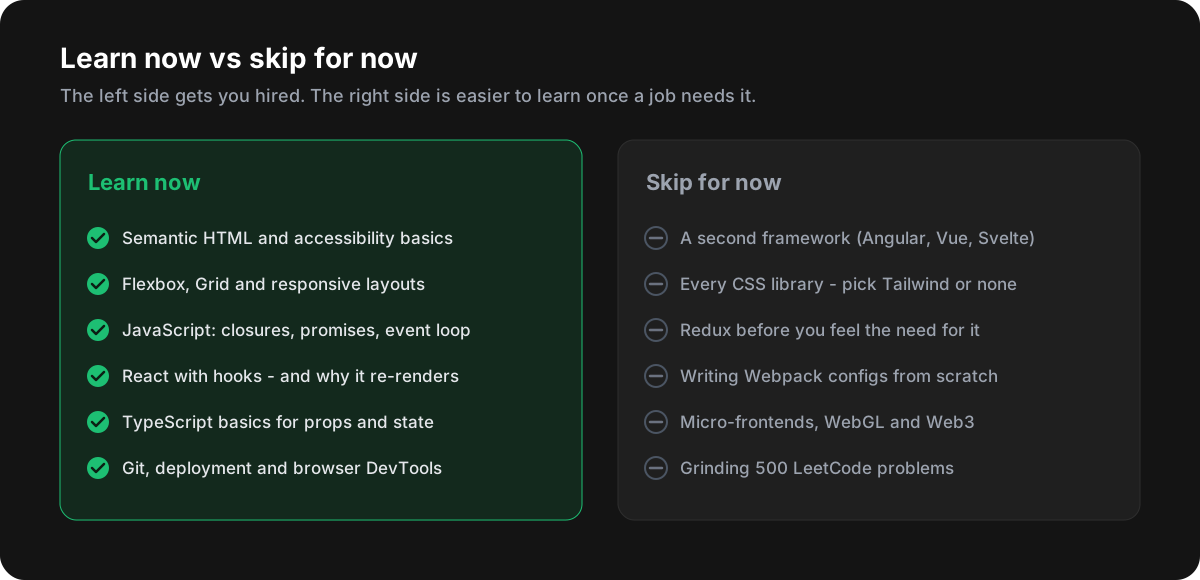
None of the skip list is useless - it's just not what gets you your first frontend job. Once you know React well, picking up Vue or Angular for a job takes weeks, not months. Redux and similar tools make sense once you've felt the problem they solve. Build tools are usually already set up by the time you join a team.
Mistakes that slow people down
- Tutorial loops. Watching a fourth React course feels like progress. Building something without a video is what actually teaches you.
- Framework before language. If
this, closures and promises still feel like magic, go back to JavaScript before learning more React. - Learning in a straight line. Revisit earlier stages as you go. You will understand CSS Grid better after building a real dashboard.
- Hiding your work. Push to GitHub from the first week. A green contribution graph and real commit history are evidence.
- Waiting to be ready. Nobody feels ready. Apply when you meet about 60% of a job post.
Common questions
Do I need a computer science degree?
No. Many companies hire frontend developers based on skills and projects. A degree helps with some large companies and campus hiring, but a strong portfolio and good interview answers open most doors.
React, Angular or Vue - which should I learn?
Check the job posts in your city. For most people React has the most openings, so start there. The concepts - components, state, props and effects - transfer to any framework.
Is TypeScript required for a first job?
It is increasingly expected, and it's not hard once you know JavaScript well. Learn the basics in stage 2 and use it in at least one of your projects.
How much DSA do frontend developers need?
Less than backend roles, but not zero. Be comfortable with arrays, strings, objects and maps, and common patterns like two pointers and sliding window. Product companies ask more than service companies.
Follow the roadmap and track your progress
The Frontend Developer roadmap on this site follows exactly these four stages, with each topic linked to a lesson, quiz or question bank.
Almost at stage 4? Build an ATS-friendly resume with the free ATS Resume Builder before you start applying.
Keep going: Frontend Developer roadmap
Start now