Career
Why Your Resume Gets Rejected Before a Human Reads It (and How to Fix It)
You've applied to 40 jobs. The roles fit, your skills match, and you've heard nothing back - not even a rejection. Before you decide the job market is impossible, check something simpler: there's a good chance no person ever read your resume.
Most mid-size and large companies, and many startups, run hiring through an Applicant Tracking System (ATS) - software such as Workday, Greenhouse, Lever, iCIMS or Taleo. In India, recruiters also search job-portal databases like Naukri by keyword. Either way, software reads your resume first, and a person only sees it if the software puts it in front of them.
This guide explains what actually happens after you click Apply, the eight mistakes that keep software engineers off the shortlist, and a checklist you can run through in ten minutes.
What happens after you click "Apply"
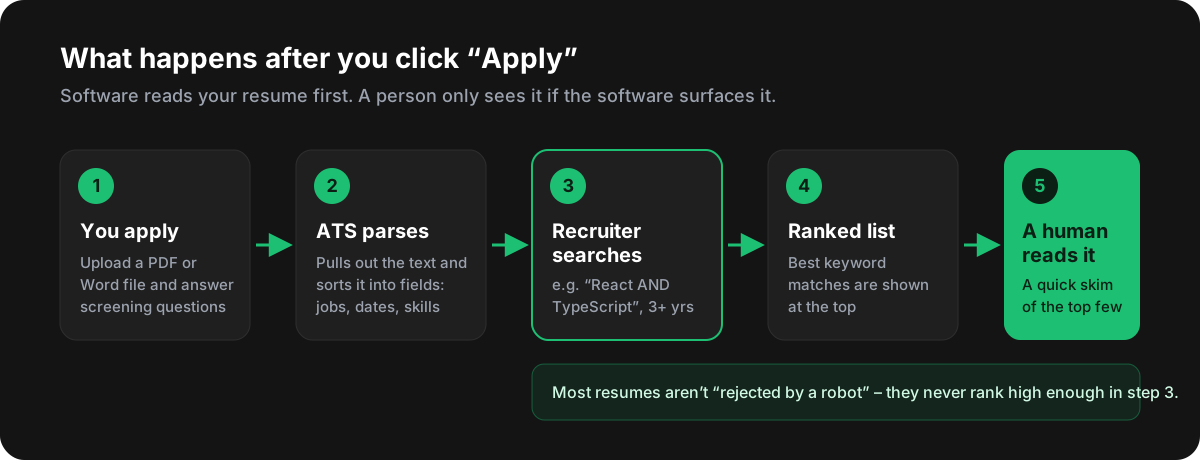
- Parsing. The ATS pulls the text out of your file and sorts it into fields: name, contact details, job titles, employers, dates, education and skills.
- Screening questions. Many applications add knockout questions - notice period, location, work authorisation, years of experience. The wrong answer here can filter you out before your resume is even looked at.
- Search and ranking. The recruiter searches or filters the applicants - for example
React AND TypeScriptwith 3+ years of experience - and the ATS ranks resumes by how well they match. - The human skim. Only then does a recruiter open the top resumes, usually for a quick skim before deciding who gets a call.
A popular myth says a robot reads your resume and rejects it. In most companies the ATS doesn't reject anyone on its own. The real problem is quieter: a resume the software can't read, or one missing the right keywords, never shows up near the top of the recruiter's search. The good news - that part is entirely in your control.
The 8 mistakes that keep your resume off the shortlist
1. A layout the parser can't read
Two-column templates, tables, text boxes and designer layouts look great to people and confuse parsers. Many parsers read a page straight across, line by line - so a sidebar full of skills gets mixed into your job history, and dates end up attached to the wrong role.
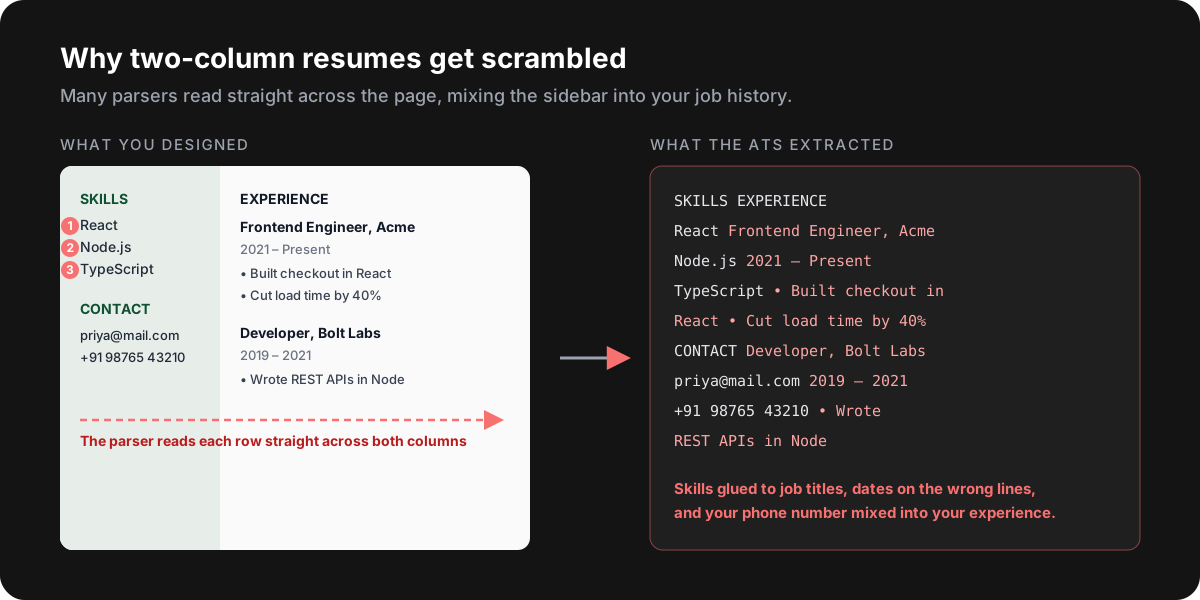
Fix: use a single column, with sections stacked top to bottom, and keep each date on the same line as the role it belongs to.
2. Text that isn't really text
If your resume was exported from a design tool as an image, scanned from paper, or has words built into graphics, the ATS may see an almost empty page. A quick test: open your PDF, press Ctrl + A, copy, and paste into Notepad. Whatever doesn't come through, an ATS won't see either.
Fix: write your resume in Word, Google Docs or a resume builder, and export a text-based PDF.
3. Missing the keywords from the job description
Recruiters search for the exact skills in the job post. If the job asks for Next.js, REST APIs and Jest, and your resume says "modern React frameworks", "backend integration" and "testing", you won't match that search - even if you've done all three.
- Mirror the job post's wording for skills you genuinely have: write
Next.js, not "React SSR framework". - Spell out common acronyms once alongside the short form: "Continuous Integration (CI/CD)", "Amazon Web Services (AWS)".
- Put keywords where they carry weight: in your Skills section and in the bullets that prove you used them.
4. Creative section headings
An ATS looks for standard headings to understand what it's reading. "My Journey", "What I Bring" or "Toolbox" may not be recognised, so your experience or skills can be filed in the wrong place - or skipped.
Fix: use the plain, standard ones: Summary, Experience, Projects, Skills, Education, Certifications.
5. Icons, skill bars and photos
Phone and email icons, star ratings, "React ●●●●○" skill bars and profile photos either turn into garbage characters or disappear. A skill bar also tells a recruiter nothing - four dots out of five means something different to everyone.
Fix: use plain text labels ("Email:", "Phone:") and list skills as words. Leave the photo off unless the job post asks for one.
6. Contact details in the header or footer
Some parsers skip the page header and footer entirely. If your email and phone number live there, a recruiter can find a great profile with no way to contact you.
Fix: put your name, email, phone, city, LinkedIn and GitHub as normal text at the top of the page itself.
7. Duties instead of results
Once your resume reaches a person, a list of responsibilities is forgettable. "Responsible for developing UI components" describes the job, not what you achieved in it.

A strong bullet answers three questions: what did you build or change, how big was it, and what improved? If you don't have exact numbers, honest estimates ("about 20 screens", "roughly 30% faster") are far better than none.
| Instead of | Write |
|---|---|
| Worked on the checkout page. | Rebuilt the checkout flow in React, cutting drop-off at the payment step by 12%. |
| Responsible for API development. | Designed 18 REST endpoints in Node.js and Express serving 40k requests a day. |
| Helped with testing. | Added Jest and React Testing Library to a legacy app, raising test coverage from 20% to 75%. |
| Did performance optimisation. | Cut the dashboard's load time from 6s to 2s with code splitting and memoisation. |
The numbers in these examples are illustrations - use your own. Never invent metrics: interviewers will ask you about them.
8. One generic resume for every job
Sending the same resume everywhere makes it a weak match for most of the jobs. You don't need a new resume for every application - just adjust your summary, reorder your skills, and move the most relevant bullets to the top for each role.
Your 10-minute ATS checklist
- Single-column layout with standard section headings
- A text-based PDF or .docx - the copy-paste test passes
- Name, email, phone, city, LinkedIn and GitHub as plain text at the top
- Skills written exactly the way the job post writes them
- Every recent role has 3-6 bullets that start with an action verb, most with a number
- No icons, skill bars, photos, tables or text boxes
- One page with under 5 years of experience; two pages at most otherwise
- No typos in company names, tools - or your own email address
Common questions
PDF or Word - which is safer?
Modern ATS handle text-based PDFs well, and a PDF keeps your formatting intact. If an application specifically asks for .docx, send .docx. What matters most is that the text can be selected and copied.
Can I hide extra keywords in white text?
No. Parsers strip the colour and show recruiters the raw text, so hidden keywords appear as a messy block and look like an attempt to game the system. Add keywords only where they're true.
Will employment gaps get me filtered out?
Usually not by the software itself, but recruiters do notice them. A one-line entry such as "Career break - upskilling in React and system design", plus any courses, freelance work or projects from that time, turns a question mark into a story.
Is there an ATS score I need to hit?
No universal score exists - every company's system and every recruiter's search is different. Treat any ATS score, including ours, as a checklist for finding problems rather than a pass mark.
Check your resume before your next application
You now know what the software looks for. The fastest way to see how your own resume measures up is to test it.
Starting from scratch? The ATS Resume Builder gives you a clean single-column layout that passes every item on the checklist above, scores it live as you type, and downloads as a PDF.
Keep going: Check your ATS score
Start now